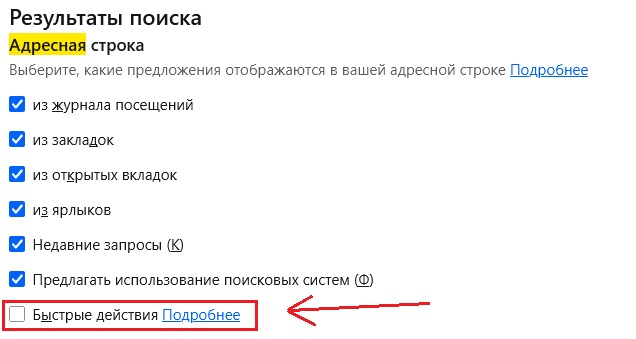
How to delete button "reboot firefox" from PC version of firefox?

This button interferences me too much. I often miss click by my mouse and reboot all tabs. It's a hell. How to delete this trash?
This button interferences me too much. I often miss click by my mouse and reboot all tabs. It's a hell. How to delete this trash?

Izabrano rješenje
That “Restart Firefox” entry is coming from Firefox’s own address-bar suggestions (often Firefox Suggest or an extension). To disable it, go to Settings → Privacy & Security → Address Bar → uncheck “Firefox Suggest” (and Search Suggestions) or remove the extension adding restart control.
Pročitaj ovaj odgovor u kontekstu 👍 1Svi odgovori (3)
Odabrano rješenje
That “Restart Firefox” entry is coming from Firefox’s own address-bar suggestions (often Firefox Suggest or an extension). To disable it, go to Settings → Privacy & Security → Address Bar → uncheck “Firefox Suggest” (and Search Suggestions) or remove the extension adding restart control.