


Windows 10 reached EOS (end of support) on October 14, 2025. If you are on Windows 10, see this article.

Pretraži podršku

Izbjegni prevare podrške. Nikad te nećemo tražiti da nas nazoveš, da nam pošalješ telefonski broj ili da podijeliš osobne podatke. Prijavi sumnjive radnje pomoću opcije „Prijavi zlouporabu”.

Saznaj više

Can’t disable typing bar at bottom of screen

  • 3 odgovora
  • 1 ima ovaj problem
  • 109 prikaza
  • Posljednji odgovor od James Davies
  • Riješeno

When I am using Firefox for iOS, and I click on any text input, a bar appears at the bottom of the screen. This bar contains nothing apart from ‘↑ ↓ Done’ on the right. This bar is really annoying and moves the page around irritatingly.

If I click ‘Done’ it will temporarily remove the bar until I click on a text input again, and it will appear again.

I would like to know if this is something to do with Firefox or the device iOS settings.

This thread from apple discussions has the same problem: https://discussions.apple.com/thread/255143785?sortBy=rank

A screenshot is attached.
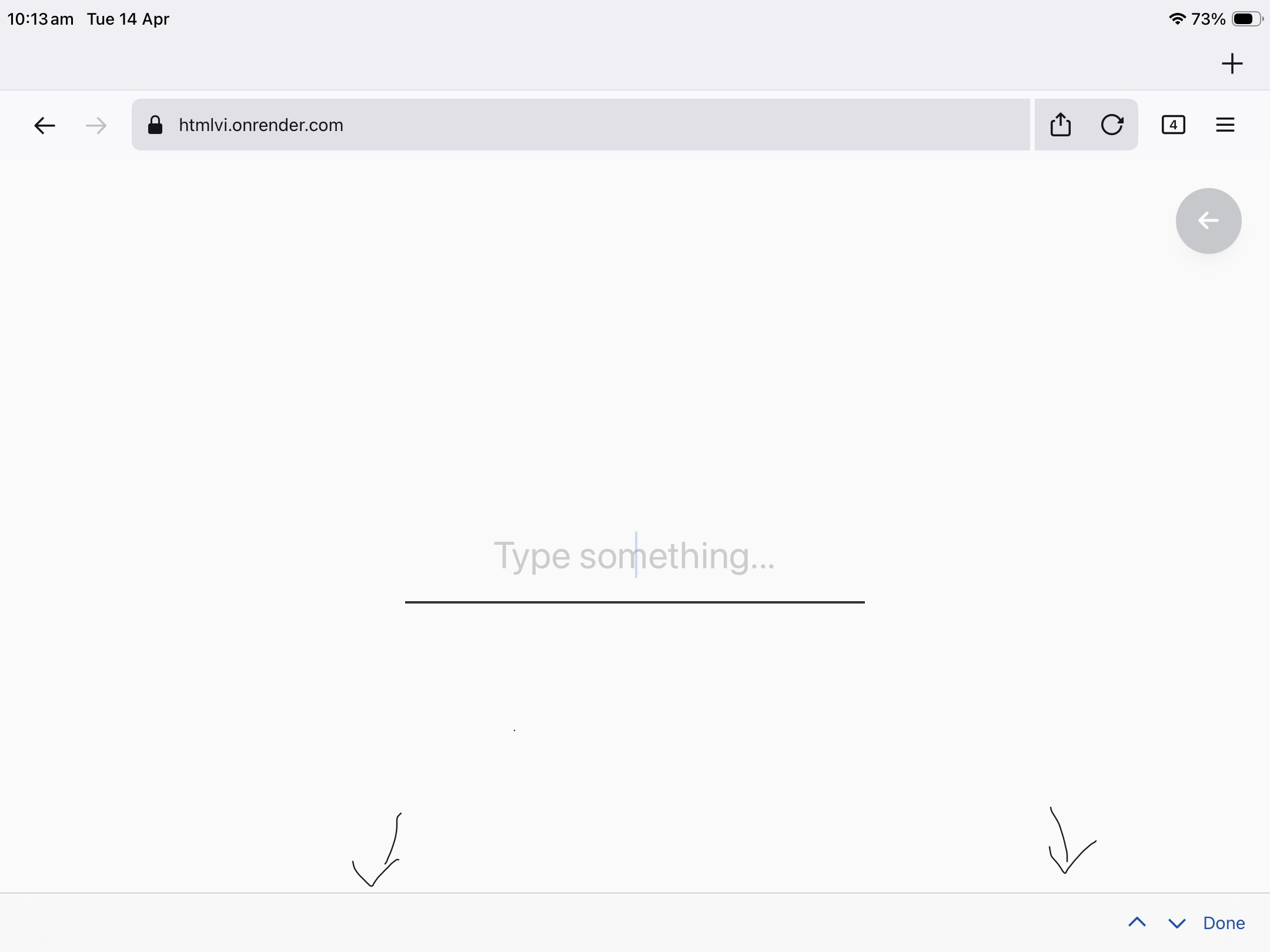
When I am using Firefox for iOS, and I click on any text input, a bar appears at the bottom of the screen. This bar contains nothing apart from ‘↑ ↓ Done’ on the right. This bar is really annoying and moves the page around irritatingly. If I click ‘Done’ it will temporarily remove the bar until I click on a text input again, and it will appear again. I would like to know if this is something to do with Firefox or the device iOS settings. This thread from apple discussions has the same problem: https://discussions.apple.com/thread/255143785?sortBy=rank A screenshot is attached.
Priložene slike ekrana

Izabrano rješenje

Don’t worry, I found the problem! I just needed to update to a new version of Firefox, with more settings to turn this off.

Thanks for helping!

Pročitaj ovaj odgovor u kontekstu 👍 0

Svi odgovori (3)

Hi James, do you happen to use an external keyboard?

Also, could you please share the following:

  • Your Firefox version
  • Your iOS version
  • The HTML rendered in the screenshot (or an actual website where this issue happens for you)

Odabrano rješenje

Don’t worry, I found the problem! I just needed to update to a new version of Firefox, with more settings to turn this off.

Thanks for helping!

Postavi pitanje

Za odgovaranje na poruke moraš se prijaviti na tvoj račun. Postavi novo pitanje, ako još nemaš račun.