moving a folder to a "local folder" in Thunderbird.

I was cleaning up my GMX account in Thunderbird. Then, I wanted to move a whole folder out of the normal one and picked "local folder", but now I can't find where that local folder should be.
It would be very important for me to find my files again.
Why does it say "local folder" when it doesn't create a local folder somewhere?
Thank you for your help.
Svi odgovori (5)
Please provide the detail steps you took, as I am having trouble following you. The move to 'local folders' opens a menu that lists local folders, yet you indicate not knowing where the messages went. Also, did you move messages or a folder?
So, I wanted to free up space in my GMX account and did this in Thunderbird. I looked at various folders in the sidebar on the left, and one folder contained many emails. I wanted to move it; a menu opened, and I selected "Move to local folders." After that, my selected folder disappeared, and I don't know where to look for these "local folders"! Now the same folder name appears under Archives, but the folder is completely empty. Not a single email is displayed. I moved the main folder, not individuell files.
My first suggestion is to log onto the GMX account and see if they are there. Moving folders from IMAP accounts is always problematic; that's why I always suggest COPY instead. This is because the network (out of Thunderbird's control) is involved during transfers of online messages, and there is also the possibility (as has happened to many users who posted here) that the moved folders had only headers, and not the content.
In the future, I suggest these steps:
- check that the messages are all intact, both header and content
- click help>troubleshootinginformation
- scroll to 'profile folder' and click 'open folder'
- exit thunderbird, you are now in the profile
- click the imapmail folder and then the imap account folder
- identify the desired folders, which will be in two components, such as inbox, inbox.msf, sent, sent.msf. COPY the desired folders (but NOT the msf entries) and then PASTE into the Mail\Local Folders folder (you need to rever to profile folder from which you clicked the imapmail folder, but this time, click the Mail folder.
- restart thunderbird and check the Local Folders to ensure the messages are all there
- you can now delete the IMAP folder if no longer needed
Hallo David, danke für deine Vorschläge.
Aber ich habe bei GMX bislang nicht die Datei gefunden. Es ist wohl für immer weg. Sehr schade und äußerst ärgerlich für mich, weil da waren wichtige E-Mails dabei und so weiter.
Gibt es irgendeine andere Möglichkeit, das wiederherzustellen?
Gruß, Rikki
Trax El said
I wanted to move it; a menu opened, and I selected "Move to local folders."
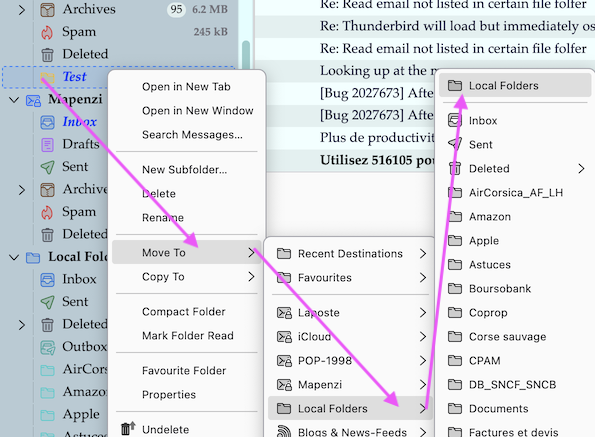
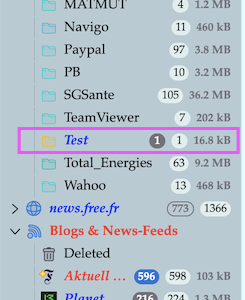
I reproduced your manoeuvre in my Thunderbird installation, creating a Test folder in my POP account, then R-click on folder Test > Move to > Local Folders and in the drop-down folder list select "Local Folders" at its top (see images).
Trax El said
After that, my selected folder disappeared, and I don't know where to look for these "local folders"!
If you use the German locale of Thunderbird your "Local Folders" should be called "Lokale Ordner". Normally they appear in the folder pane beneath the account folders. If you can't find them you may have renamed them in your Account Settings You may also post your question in the German Thunderbird Mail DE forum https://www.thunderbird-mail.de/forum/