


Windows 10 reached EOS (end of support) on October 14, 2025. If you are on Windows 10, see this article.

Pretraži podršku

Izbjegni prevare podrške. Nikad te nećemo tražiti da nas nazoveš, da nam pošalješ telefonski broj ili da podijeliš osobne podatke. Prijavi sumnjive radnje pomoću opcije „Prijavi zlouporabu”.

Saznaj više

I want Archives to save emails in seperate files

  • 1 odgovor
  • 0 ima ovaj problem
  • Posljednji odgovor od Mapenzi

Hi,

I need some help! Thunderbird used to have archive settings in which I could choose to save my e-mails locally in my archive folders with 1 file per 1 email and not everything that's in a folder saved to a single file.

How can I get this back? Is there some hidden settings that can be accessed to get it done?

I need every email in one file! I'm going nuts trying to sort years of e-mail duplicates. If I can have a file per message, then I can at least use my PC duplicate file program to compare file content and find the similar ones. But with everything of one folder in the same archive file I'll be cursed to have to manually go through thousands of e-mails by hand! So if there is a way to return the previous archive format (*wdseml files??, it seems?) then I want to know how to set that setting.

Alternatively a local folder duplicate e-mail cleaning tool? There used to be some but I couldn't get it to work now!

Hi, I need some help! Thunderbird used to have archive settings in which I could choose to save my e-mails locally in my archive folders with 1 file per 1 email and not everything that's in a folder saved to a single file. How can I get this back? Is there some hidden settings that can be accessed to get it done? I need every email in one file! I'm going nuts trying to sort years of e-mail duplicates. If I can have a file per message, then I can at least use my PC duplicate file program to compare file content and find the similar ones. But with everything of one folder in the same archive file I'll be cursed to have to manually go through thousands of e-mails by hand! So if there is a way to return the previous archive format (*wdseml files??, it seems?) then I want to know how to set that setting. Alternatively a local folder duplicate e-mail cleaning tool? There used to be some but I couldn't get it to work now!

Svi odgovori (1)

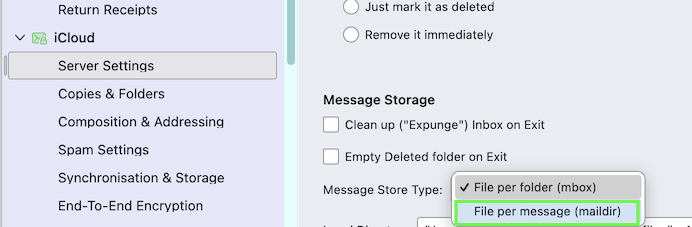
If you want to store your messages (received, sent, archived, ...) in the "file per message" format - also called maildir format - you have to go to Account Settings > account name > Server Settings > Message Storage and select "File per message (maildir)"
Postavi pitanje

Za odgovaranje na poruke moraš se prijaviti na tvoj račun. Postavi novo pitanje, ako još nemaš račun.