


Can't delete emply folders in Thunderbird

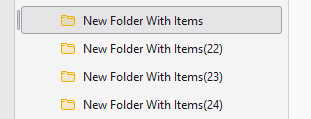
As everyone using Thunderbird knows, TB folders are displayed in a column down the left side. Four of those folders are named "New Folder With Items" (three with numbers appended to the name). Those folders are empty, and I have no idea how they got there in the first place. I've tried deleting them but they always remain as before. I've attached a screenshot of those folders.
This is not a "serious" problem, just an annoying one. Any ideas how to actually delete those folders?
Svi odgovori (4)

Do they appear when you access your email via the service's web interface?
No, only in Thunderbird.
See if you can unsubscribe those folders:
In the L. column, R. click the account (just above the Inbox) > Subscribe
Also go to TB menu > Account Settings > Server Settings > click the 'Advanced' buttonand make sure 'Show only subscribed folders' is enabled.
This morning, without doing any of the things you suggested, I was able to delete those folders. Why? Who knows...