


Windows 10 reached EOS (end of support) on October 14, 2025. For more information, see this article.

Pretraži podršku

Izbjegni prevare podrške. Nikad te nećemo tražiti da nas nazoveš, da nam pošalješ telefonski broj ili da podijeliš osobne podatke. Prijavi sumnjive radnje pomoću opcije „Prijavi zlouporabu”.

Saznaj više

CardDAV-Calendar fault detection of conflicts; strange acting with conflict handling

  • 2 odgovora
  • 0 ima ovaj problem
  • 13 prikaza
  • Posljednji odgovor od RalfK

više opcija

Hello,

interesting behavior with a CalDaV calendar entry/date.

Scenario: Create a calendar-entry (date) with an alarm-setting (1h before...). Wait until the new entry is synced to the CalDAV server, in my case a Nextcloud. Close TB. Got to the Nextcloud calendar, or to and other client with that CalDAV Calendar, and remove the alarm, I do frequently in case the date paste... Start TB. After sync of the calendar, TB is telling you, that the date was changed at the server and asked "how to handle the detected conflict" (see screenshot). But 1. it isn't a conflict, just a normal change, which should change the local, "old" date 2. acting on the conflict resolution by pressing the button "Skip changes, load new" (Änderungen verwerfen und neu laden), I'm expecting to get the server version exchanging the local, old one... It does not: The local version will stay with the alarm. These date will not sync to server until TB is restarted. The alarm is now back on the server.

If the alarm is removed at the server (or on another client) while TB is running, the alarm is removed locally as "normal" change by synchronization...

I guess it is a bug!?

I'm using TB Version 128.4.3esr; build-id: 20241108210256 on Windows 11 (64bit). But this is also with TB under Linux (ubuntu, mint)

Gruss Ralf
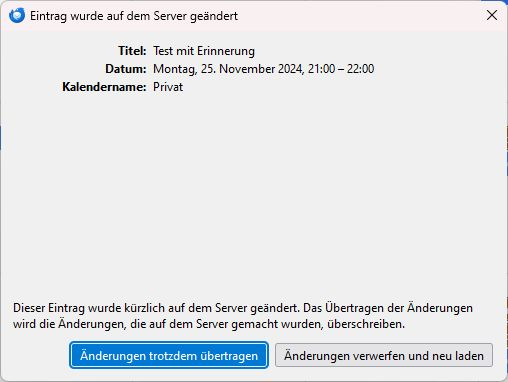
Hello, interesting behavior with a CalDaV calendar entry/date. Scenario: Create a calendar-entry (date) with an alarm-setting (1h before...). Wait until the new entry is synced to the CalDAV server, in my case a Nextcloud. Close TB. Got to the Nextcloud calendar, or to and other client with that CalDAV Calendar, and remove the alarm, I do frequently in case the date paste... Start TB. After sync of the calendar, TB is telling you, that the date was changed at the server and asked "how to handle the detected conflict" (see screenshot). But 1. it isn't a conflict, just a normal change, which should change the local, "old" date 2. acting on the conflict resolution by pressing the button "Skip changes, load new" (Änderungen verwerfen und neu laden), I'm expecting to get the server version exchanging the local, old one... It does not: The local version will stay with the alarm. These date will not sync to server until TB is restarted. The alarm is now back on the server. If the alarm is removed at the server (or on another client) while TB is running, the alarm is removed locally as "normal" change by synchronization... I guess it is a bug!? I'm using TB Version 128.4.3esr; build-id: 20241108210256 on Windows 11 (64bit). But this is also with TB under Linux (ubuntu, mint) Gruss Ralf
Priložene slike ekrana

Svi odgovori (2)

više opcija

At least "detecting a conflict" seems to be gone with version 128.5.1esr...

više opcija

Hello,

running my calendars without "Offline support": no problems seen so far... TB: 128.10.0esr (64-Bit)

Can it be a problem with CalDAV-updates against a local cache?

Regards

Ralf