


Windows 10 reached EOS (end of support) on October 14, 2025. If you are on Windows 10, see this article.

Pretraži podršku

Izbjegni prevare podrške. Nikad te nećemo tražiti da nas nazoveš, da nam pošalješ telefonski broj ili da podijeliš osobne podatke. Prijavi sumnjive radnje pomoću opcije „Prijavi zlouporabu”.

Saznaj više
Arhivirano

Problem Importing addresses from a CSV

davidswoods60

I have a CSV file from Outlook with addresses I want to import into Thunderbird.

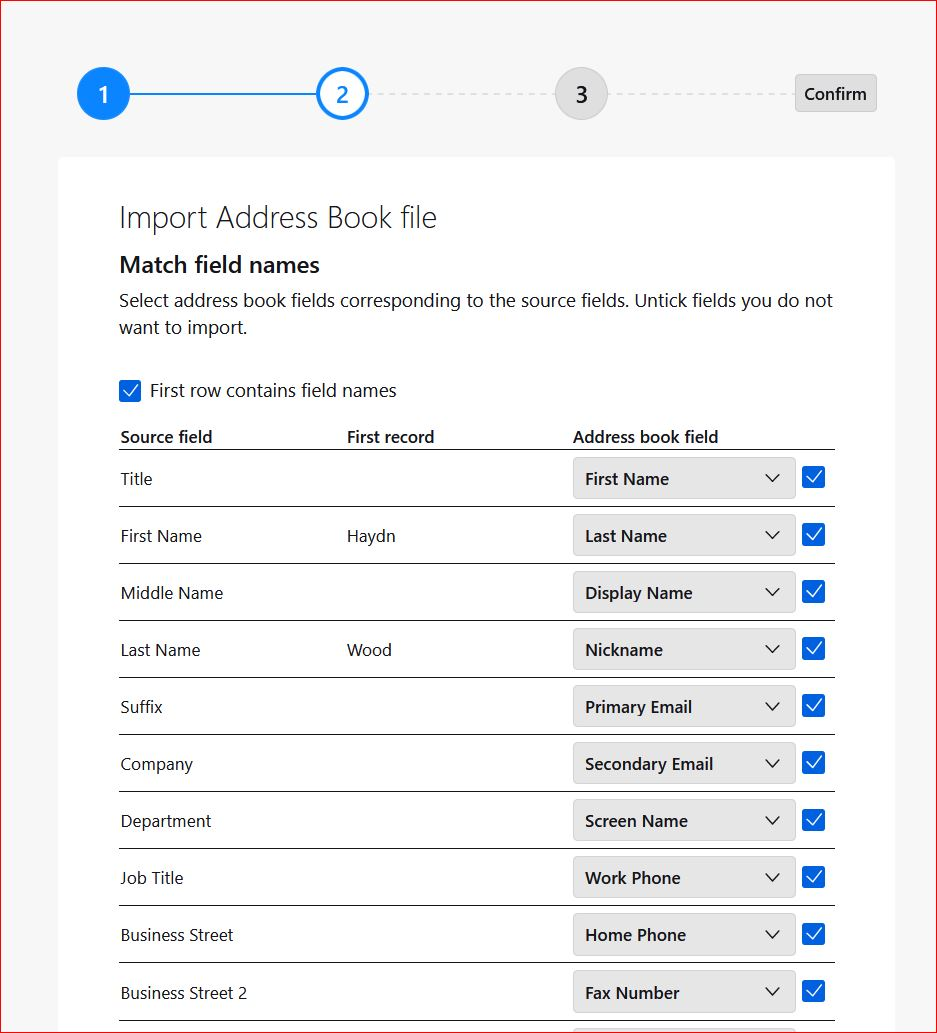
In an older version of Thunderbird I was able to match the fields in the CSV to the fields in the Thunderbird address book but in the latest version this seems to be missing - I was able to move the fields up/down to match before importing but this doesn't seem to be available (see attached screen shot). The import screen looks different with no way of moving fields up/down to match.

The drop down arrows on the fields on the right (the Thunderbird address fields) only show one field so I am not able to match them.

How do I match the fields to the CSV file so I can import my addresses/contacts.

Thanks
I have a CSV file from Outlook with addresses I want to import into Thunderbird. In an older version of Thunderbird I was able to match the fields in the CSV to the fields in the Thunderbird address book but in the latest version this seems to be missing - I was able to move the fields up/down to match before importing but this doesn't seem to be available (see attached screen shot). The import screen looks different with no way of moving fields up/down to match. The drop down arrows on the fields on the right (the Thunderbird address fields) only show one field so I am not able to match them. How do I match the fields to the CSV file so I can import my addresses/contacts. Thanks
Priložene slike ekrana

Svi odgovori (1)

i have had success this way: - place at least one address manually in addressbook - then export it as csv - use the exported csv as a model for your outlook csv. I do this in a spreadsheet to align the columns and top row to match - once down, save as csv and it should import properly.