


I Save HTML documents containing Bulleted items (lists) from Firefox. When the saved documents are opened with Firefox, the bulletsb are missing, but when opened with MsEdge they are there?

'I Save HTML documents containing Bulleted items (lists) from Firefox. When the saved documents are opened with Firefox, the bulletsb are missing, but when opened with MsEdge they are there. Clearly the Saved File has the Bullet markers embedded (even if not identical to the original), so why can't Firefox show them? The particular files that I Save locally are "LibreOffice Release Notes" '
Odabrano rješenje
If you right-click an item in the bulleted list and choose Inspect, Firefox will open the developer tools panel to the Page Inspector. The style rules should appear on the right side.
Svi odgovori (4)
Sorry about that spam. The filter must be down at the moment.
This page --
https://wiki.documentfoundation.org/ReleaseNotes/7.5
-- looks super-basic, but for some reason, the site is using an image for the bullets instead of just using build-in round bullets.
It looks like Firefox didn't save the bullet image to disk when I saved the page. I can get the normal built-in bullets to appear if I disable the style rule assigning the image --
-- but why do I need to do this? Probably Firefox should do that automatically, like Edge.
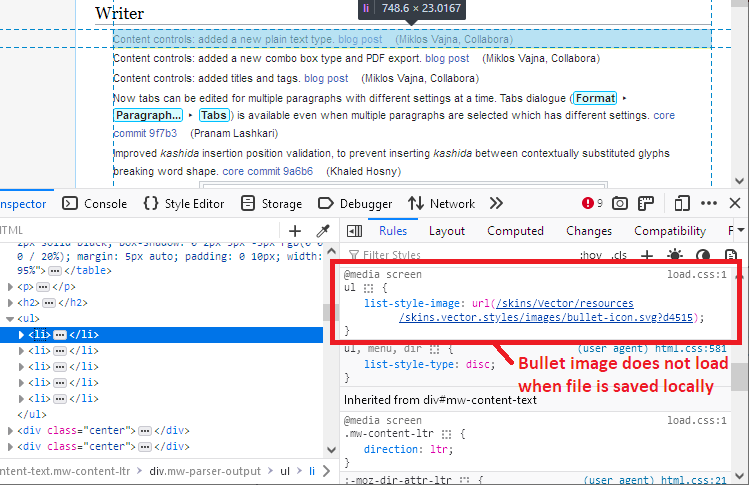
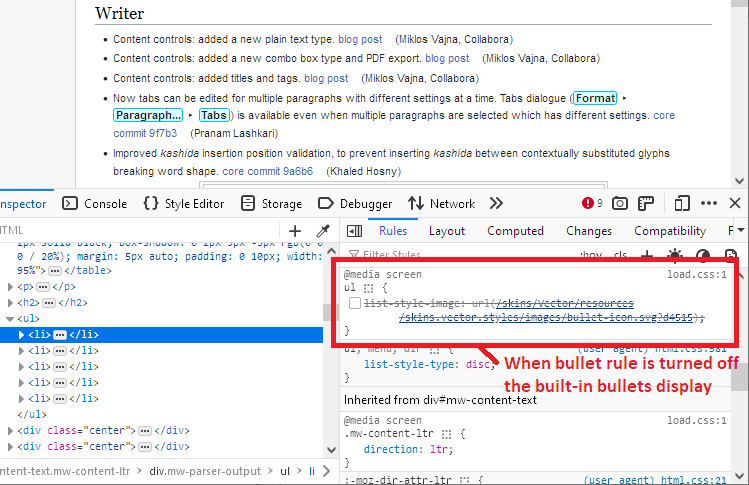
I filed a new bug: https://bugzilla.mozilla.org/show_bug.cgi?id=1814331
So How do I get to "disable the style rule assigning the image" to fix things? I only used Firefox Command Line: <File> <Safe Page As> <Type> < Web Page complete (*.htm; *.html)> The only other difference I noticed between Original and Local file were some image sizes.
Odabrano rješenje
If you right-click an item in the bulleted list and choose Inspect, Firefox will open the developer tools panel to the Page Inspector. The style rules should appear on the right side.