


Unread emails not being hilighted now in 91.1.0

In many cases, starting with 91.1.0 (as of 9Sept21), unread emails sometimes loose their displayed highlight. This didn't happen in previous versions.
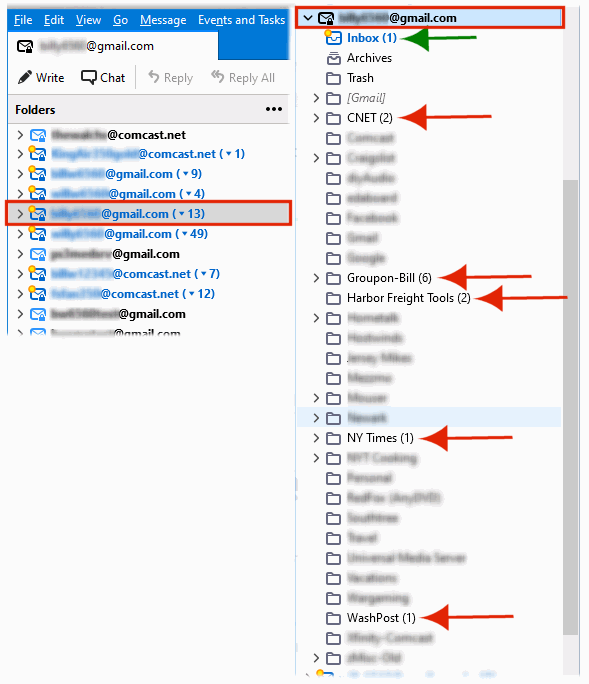
As you can see in the attached image, the root email folder example (highlighted in red) shows 13 unread emails, yet in the email's content listing (to the right), only the Inbox is highlighted with one email. The remainder of emails (12) are not highlighted. This condition isn't always seen, but it does occur. It just makes scanning the email folder contents more difficult.
Thanks, Bill
Svi odgovori (4)
Do you have Bitdefender? Its anti-spam feature can do this.
No, I'm running Spectrum's Security Suite.
The Bitdefender issue is different from yours. In your case, the number of unread messages in subfolders is shown, but the subfolder name isn't highlighted in blue. I don't know if this is a regression in 91 or a deliberate design change.
As a user, I consider this new behavior as a regression.. not by design.