


Export Bookmarks command not visible.

Export Bookmarks command not visible. Bookmarks>Show All Bookmarks>IMPORT-EXPORT NOT VISIBLE. What am I missing?
Izabrano rješenje
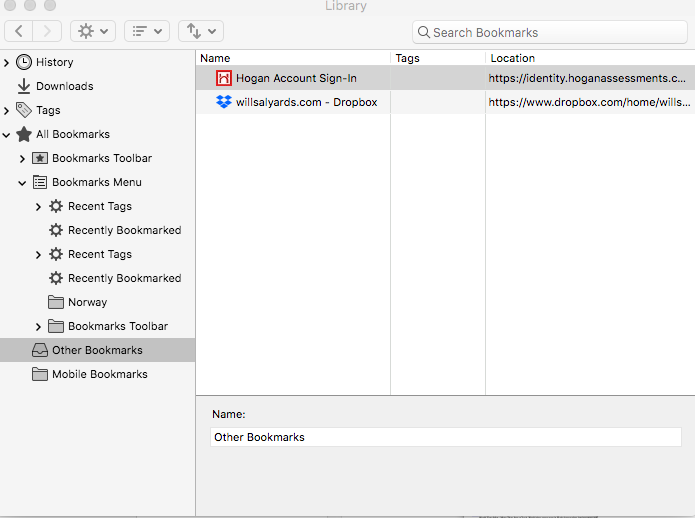
Note that on Mac you only see icons on the toolbar in the Library and not the labels like on other platforms.
In the Bookmarks Manager (Library) there is a toolbar with the Back and Forward button and three other buttons (Organize, Views, Import & Backup).
- first button (cogwheel): Organize
- second button: Views
- third button (up/down arror): Import & Backup
Svi odgovori (9)
Hello willsalyards,
What happens when you click on the button with the two up and down arrows (fourth button from the left) - in particular the little down arrow next to those other two arrows ?
Izmjenjeno od McCoy
Odabrano rješenje
Note that on Mac you only see icons on the toolbar in the Library and not the labels like on other platforms.
In the Bookmarks Manager (Library) there is a toolbar with the Back and Forward button and three other buttons (Organize, Views, Import & Backup).
- first button (cogwheel): Organize
- second button: Views
- third button (up/down arror): Import & Backup
cor-el said
Note that on Mac you only see icons on the toolbar in the Library and not the labels like on other platforms.
That's what I figured - hence I asked to click on that fourth (from the left) button .....
McCoy said
Hello willsalyards, What happens when you click on the button with the two up and down arrows (fourth button from the left) - in particular the little down arrow next to those other two arrows ?
Thank you for your response and helping me to locate the elusive button! Seems a strange place to put it.
Thank you for your response and helping me to locate the elusive button! Seems a strange place to put it.
McCoy said
cor-el saidNote that on Mac you only see icons on the toolbar in the Library and not the labels like on other platforms.That's what I figured - hence I asked to click on that fourth (from the left) button .....
Thank you for your response and helping me to locate the elusive button! Seems a strange place to put it.
Thank you for your response and helping me to locate the elusive button! Seems a strange place to put it.
willsalyards said
Thank you for your response and helping me to locate the elusive button!
My pleasure !
Seems a strange place to put it.
I think it's strange that on Mac they only show the icons and not the labels - maybe they assume that users are clairvoyant .....
That is about the platform convention on Mac and Mac has always behaved this way. There have always been differences between Mac and between Windows and Linux when it comes to displaying labels and icons on toolbar buttons and bookmarks.