


adding multiple gmail accounts in thunderbird

Hi! Ive been looking for support on how to add multiple gmail account in thunderbird but I didnt find any. I successfully set up the first gmail account but when i try to add the next gmail account, I encounter the message saying " server already exists" How do i troubleshoot it?
Izabrano rješenje
Make sure each account has a unique description. By default, Thunderbird names each account by its server, so multiple gmail accounts will show the same name unless you do something about it.
Even if this wasn't a problem in itself, I'd recommend you to give each account (particularly smtp accounts) a distinctive and useful name, so you can correctly marry up the incoming and outgoing settings. If you don't, you can end up with the wrong "from:" address in messages you send, specifically when using gmail.
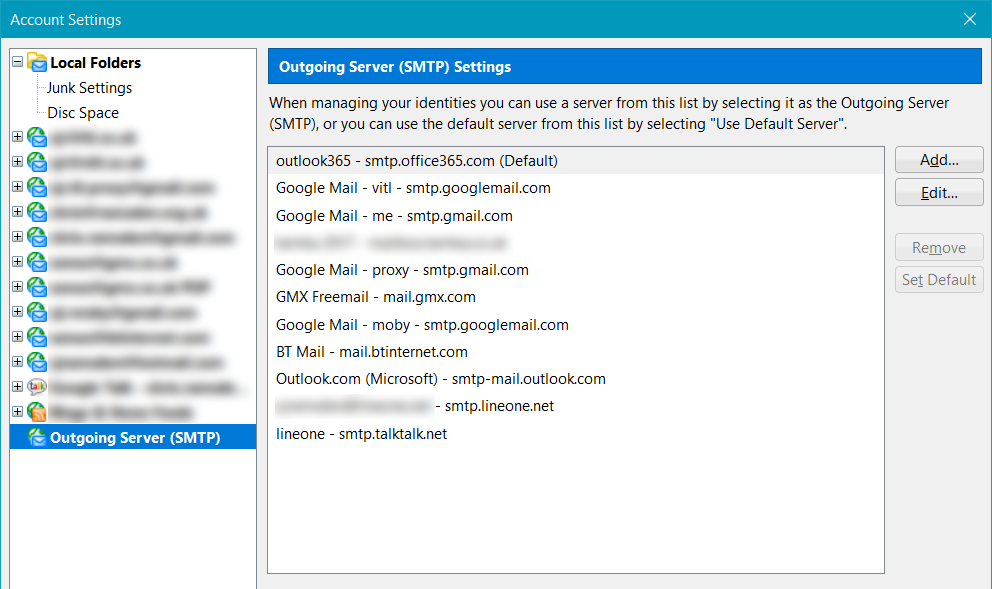
Here's an image of my smtp settings. The actual email address is one possible way of labelling each of these. But you can see I have four gmail accounts, each with a unique description that makes sense to me, and avoids the "server already exists" message.
Pročitaj ovaj odgovor u kontekstu 👍 2Svi odgovori (2)
Odabrano rješenje
Make sure each account has a unique description. By default, Thunderbird names each account by its server, so multiple gmail accounts will show the same name unless you do something about it.
Even if this wasn't a problem in itself, I'd recommend you to give each account (particularly smtp accounts) a distinctive and useful name, so you can correctly marry up the incoming and outgoing settings. If you don't, you can end up with the wrong "from:" address in messages you send, specifically when using gmail.
Here's an image of my smtp settings. The actual email address is one possible way of labelling each of these. But you can see I have four gmail accounts, each with a unique description that makes sense to me, and avoids the "server already exists" message.
Thanks very much!!! I was able to fix it. Your attachment is a big help!