


How do i get the list of open windows back when I click on the firefox icon in the taskbar, not the window image view?

When I hover over the firefox icon in the taskbar, I see an image of all my open windows. I want to see the list only view that I had for years. I upgraded to windows 10 and I Can't find a setting to change it back : (
Svi odgovori (6)

Odabrano rješenje
Could you send us a screenshot of the image with all open windows?
I can't test with Windows 10, but maybe if you right-click on the taskbar, click on Properties: in the Taskbar tab, you can set some options to custom appearance of icons in the taskbar.
Thank you , I had already tried changing the taskbar properties but there is not an option for the list mode....There is no setting any where that I can find to get back to a list of open windows : (
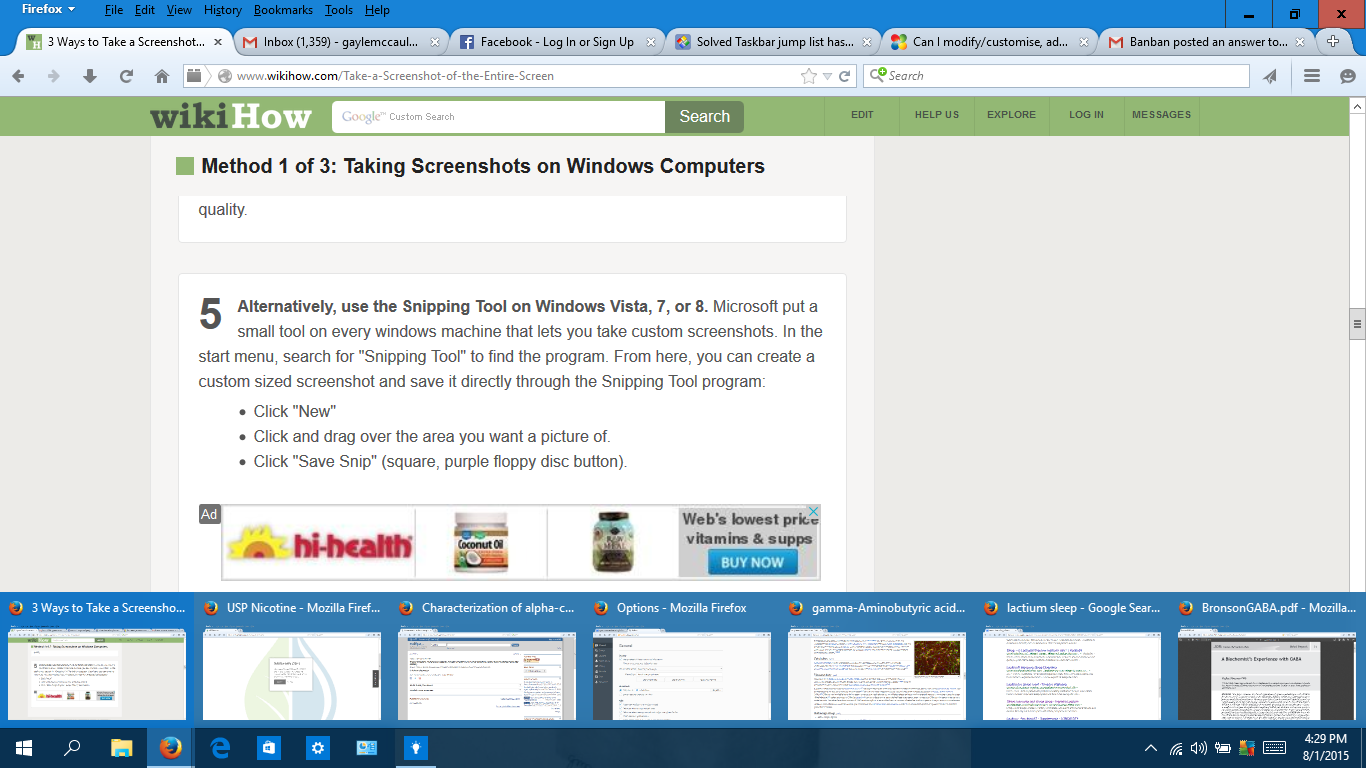
If I open more than 12 windows it automatically switches to list mode, So I need to find a way for it stay that way
Actually it is a Windows parameter, not Firefox's.
I found a tutorial to set to list mode: http://www.sevenforums.com/tutorials/75804-taskbar-list-thumbnail-preview... (always be careful when you edit Windows register !) But it will works for all programs, not only Firefox.
Just did it!Downloaded and ran it. IT WORKED ,Thank you so much ! : )
Great! I wasn't sure that it would work, but it did, so I am happy for you.
Thanks for your feedback!