


duplicate folders

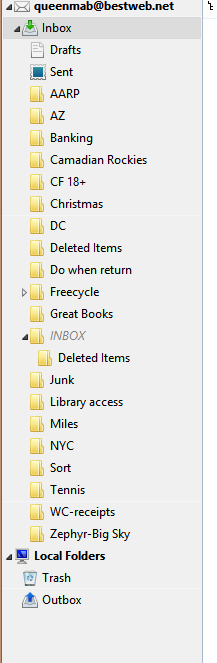
I'm using the latest version of Thunderbird (can find the version but just downloaded it this morning) and an IMAP server. I have two 'INBOX' folders (well, technically one Inbox' folder and one 'INBOX' folder) and two 'Deleted Items' folders. There is nothing in the "INBOX' folder or the second "Deleted Items' folder. However, I can't seem to delete either one. Screen shot of folders attached.
I deleted both folders on my ISP's webmail website but they still show up in Thunderbird. Can't quite figure it out.....
Thanks for any tips or help!
Izabrano rješenje
Tried that but the folders are still there. :-(
Pročitaj ovaj odgovor u kontekstu 👍 0Svi odgovori (3)
right click the account, select subscribe and uncheck the folder you do not want to see.
Right click again and select settings. On the server settings select advanced and make sure there is tick in show only subscribed folders.
Odabrano rješenje
Tried that but the folders are still there. :-(
Oops, no I did it wrong. That solved it.