


Why is "edit as new message" only available on a right-click menu on the body of an email?
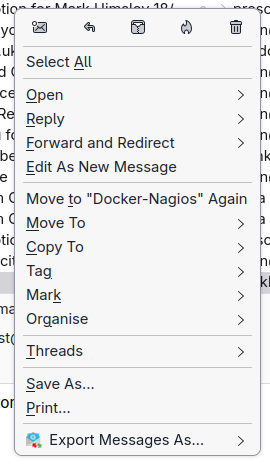
The option "Edit as New Message" is only available when a user right-clicks on the body of an email.
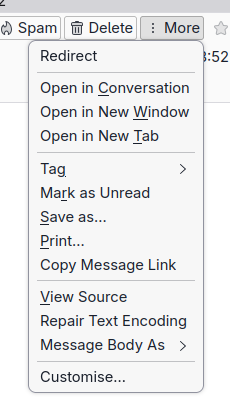
The option is not available in the menu displayed from the "More" button on an email. The option is also not available in the right-click menu on an email in a mailbox list. The option is only available in the right-click menu from the body of an email.
Requiring a user to use the right-click option in a specific area of the user interface is an accessibility issue which should be fixed.
All Replies (2)
Suggestions should be submitted to the IDEAS section at https://connect.mozilla.org/ Thank you.

The option "Edit as New Message" is only available when a user right-clicks on the body of an email.
There are other ways to do that. In the main Thunderbird window select the folder with the message in the folder pane. Select the message in the message pane. Press Alt or F10 to bring up the menu bar in case it is hidden. From the main menu bar: Message - Edit As New Message
Another way: Right-click the message in the message pane. From the drop-down menu select "Edit As New Message"
The option is also not available in the right-click menu on an email in a mailbox list.
It is, see above.
And yet another way: In the message window with the message open, select Message from the menu bar - Edit As New Message