In cards view how do I see the individual emails?
The cards view is phenominal. But how do I see the individual emails?
चुने गए समाधान
OK not very intuitive but this is the ui:
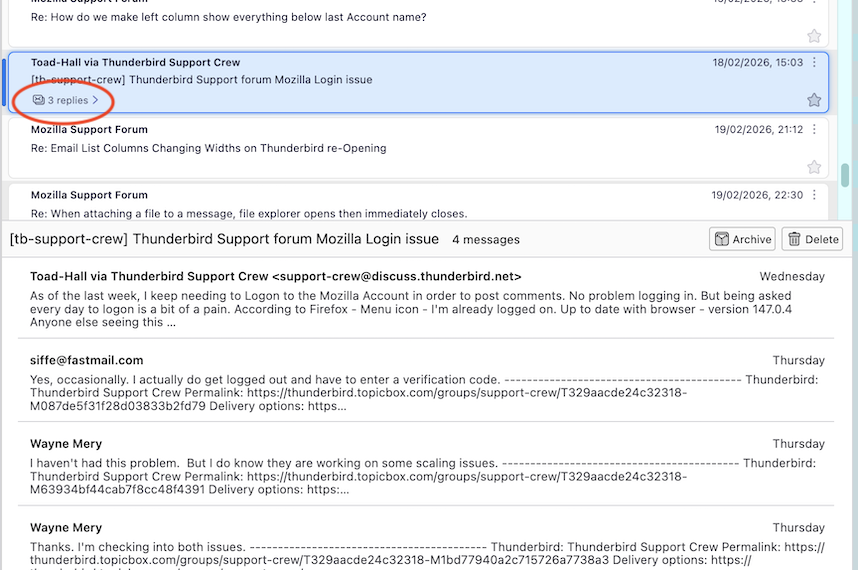
- In cards view only the sender and subject of the original email are visible in the cards list
- clicking on the card only shows the preview
- the preview shows the sender and the first three lines of the emails in the thread, not the actual message
- the card also shows "<nr> replies >" in a very dark grey
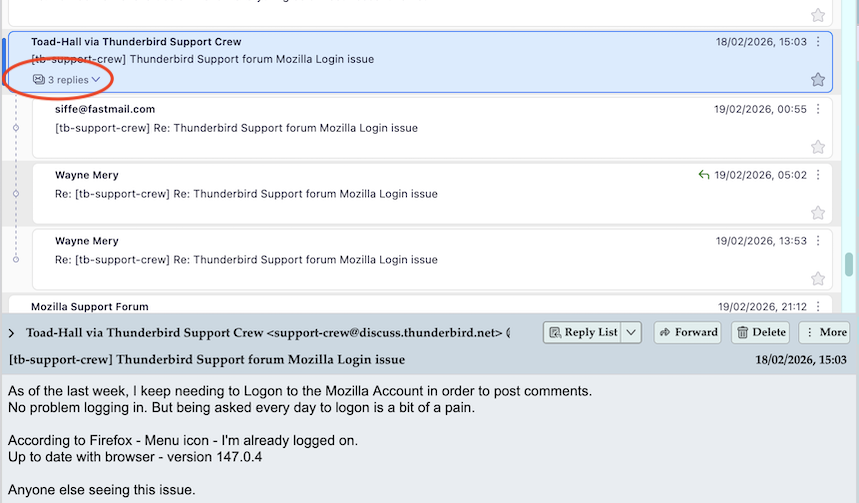
Clicking the later, the "3 replies>" will show the messages belonging to the thread. Now each message is available.
संदर्भ में यह जवाब पढ़ें 👍 0All Replies (6)
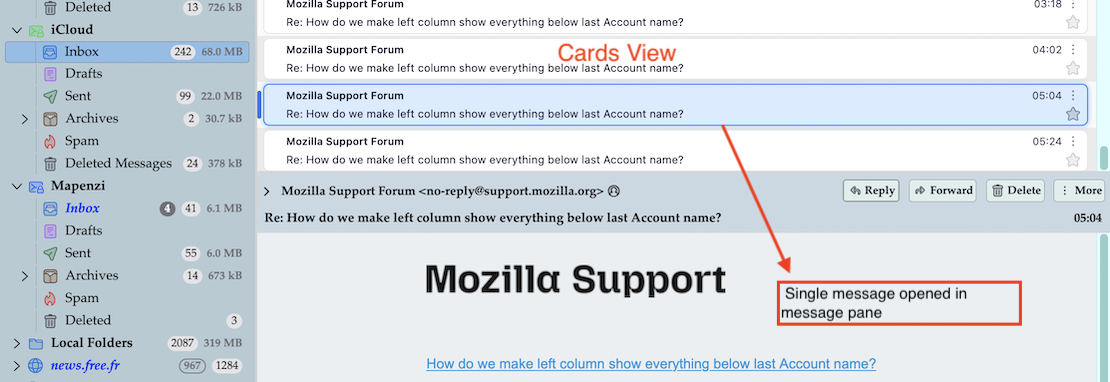
This is an example for Cards view with a single message selected (image). Are you asking how to display the contents of a single message? it's the same as in Table view: if your message pane is activated the message contents will be displayed in message pane. If the message pane is hidden message contents will be displayed via double-click in a new tab or a new window
Why would I press a, seemingly random, F8 key? Clicking the collapsed message summary card does nothing.
johannes said
Clicking the collapsed message summary card does nothing.
Frankly I don't understand what you want to say exactly. The messages in the thread pane I showed in my screen shot are no "collapsed message summary cards" but single two-row (or three-row, according to your choice) message "cards".
If you don't display the message pane and if you do a simple left-click on one of those cards, nothing will happen! That is what David wanted to explain to you when he mentioned the F8 key strike which is a short-cut to display/hide the message pane.
And if you don't want to hit the F8 key you can go to View > Layout > ✔︎ Message Pane.
If you don't like the message pane at all you'll have to double-click on a message card to read its contents in a new tab or a new window. Maybe you should show a screen shot and explain what doesn't work for you in cards view....
Mapenzi द्वारा सम्पादित
चयनित समाधान
OK not very intuitive but this is the ui:
- In cards view only the sender and subject of the original email are visible in the cards list
- clicking on the card only shows the preview
- the preview shows the sender and the first three lines of the emails in the thread, not the actual message
- the card also shows "<nr> replies >" in a very dark grey
Clicking the later, the "3 replies>" will show the messages belonging to the thread. Now each message is available.
You didn't tell us that you use the view < Sort by > Threaded ... nor did you join a screen shot for better understanding. So if a thread is collapsed you simply need to do click on the < arrow in order to expand the discussion and display all individual messages.