


Cannot log in to Google or Gmail using Firefox

Greetings,
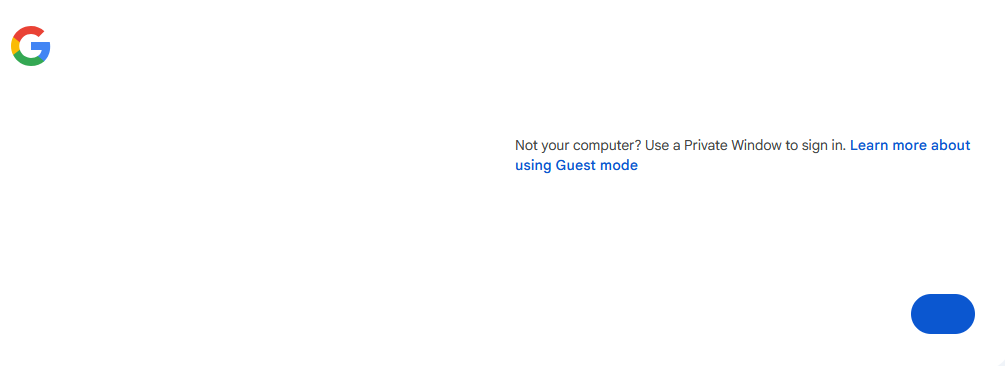
For the past three days (A/O 06/01/2026) I, (and others who have posted on various sites) cannot access a functioning log-in page for Google or Gmail via Firefox. If I (and others) use an alternate browser e.g., Edge, the log-in page functions and displays as it should. However, when using Firefox, the page displays as the image I've included - no functional 'log-in' icon and no Username or Password box. Using 'Private Viewing' makes no difference. As other browsers work, I will assume this is a Firefox issue. As there is no way to submit trouble tickets, I'll leave this here in hopes that someone from Firefox will pursue the issue.
Thank you in advance for any information or resolution.
פתרון נבחר
jbr,
I just disabled uBlock Origin and the the problem was resolved So, it seems there has been proven a recent update on their end that's causing this bug. I'll proceed with a trouble report to uBlock.
Once again, thank you for your assistance.
כל התגובות (3)
Reported as https://github.com/webcompat/web-bugs/issues/223492
Basically that looks like some assets not loading or some decisions not being made where to send the user. You should try Private Window first, then Use Troubleshoot Mode in Firefox, and alternatively try from either a temporary new profile or a separate Nightly version to see any difference. If nothing helps, this being on Windows, I'd also consider disabling any antivirus or security software for a bit to test any impact on that.
jbr,
Thank you for the reply and assistance.
I had previously tried Private Window and the disabling of my antivirus (ESET and Malwarebytes), but that had no affect. (Forgot to mention that in my initial posting.) Per your suggestions, I used Troubleshoot (didn't know it existed), and after restarting Firefox in that mode, I was able to access the Google and Gmail log in screen as before without issue. So, it now seems this is something on my PC. Because disabling ESET and Malwarebytes made no difference, and I haven't made any changes recently or added any apps, the only thing I can suspect is my uBlock Origin which I've used for years without issue. Any thoughts at this point before I proceed?
פתרון נבחר
jbr,
I just disabled uBlock Origin and the the problem was resolved So, it seems there has been proven a recent update on their end that's causing this bug. I'll proceed with a trouble report to uBlock.
Once again, thank you for your assistance.