


Avoid support scams. We will never ask you to call or text a phone number or share personal information. Please report suspicious activity using the “Report Abuse” option.

Learn More
Open

While Exporting / Importing passwords file to another browser I get a line that is invalid: chrome://FirefoxAccounts

Dr J

I recently have been having issues w/ Firefox updates & data loss involving an extension I use / Clippings. For other reasons (gaming) I installed Brave browser to compare performance. As a result of the issues I've had recently I decided it would be a good idea to have a backup (export) of my passwords & decided to Import the .csv file created into the Brave browser. The last line of the .csv file has a line that begins w/

chrome://FirefoxAccounts

.... along w/ several other fields. The information contained implies that it has something to do with Sync & also references a URL:

https://identity.mozilla.com/apps/oldsync

... along w/ MANY other operands.

What does this line do  ? This does NOT appear to be a working 'setting command' option (like: about:logins or about:debugging) in either Firefox or Chrome. The first 3 cells look similar to (some information changed):

chrome://FirefoxAccounts a5847f4e7faf42f19f17c0f531c77acc {"version":1,"accountData":{"scopedKeys":{"https://identity.mozilla.com/apps/oldsync".... more
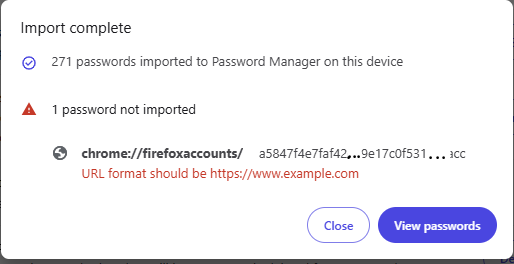
I recently have been having issues w/ Firefox updates & data loss involving an extension I use / Clippings. For other reasons (gaming) I installed Brave browser to compare performance. As a result of the issues I've had recently I decided it would be a good idea to have a backup (export) of my passwords & decided to Import the .csv file created into the Brave browser. The last line of the .csv file has a line that begins w/ chrome://FirefoxAccounts .... along w/ several other fields. The information contained implies that it has something to do with Sync & also references a URL: https://identity.mozilla.com/apps/oldsync ... along w/ MANY other operands. What does this line do ? This does NOT appear to be a working 'setting command' option (like: about:logins or about:debugging) in either Firefox or Chrome. The first 3 cells look similar to (some information changed): chrome://FirefoxAccounts a5847f4e7faf42f19f17c0f531c77acc {"version":1,"accountData":{"scopedKeys":{"https://identity.mozilla.com/apps/oldsync".... more
Hoton allon fuska da aka liƙa

You must log in to your account to reply to posts. Please start a new question, if you do not have an account yet.