


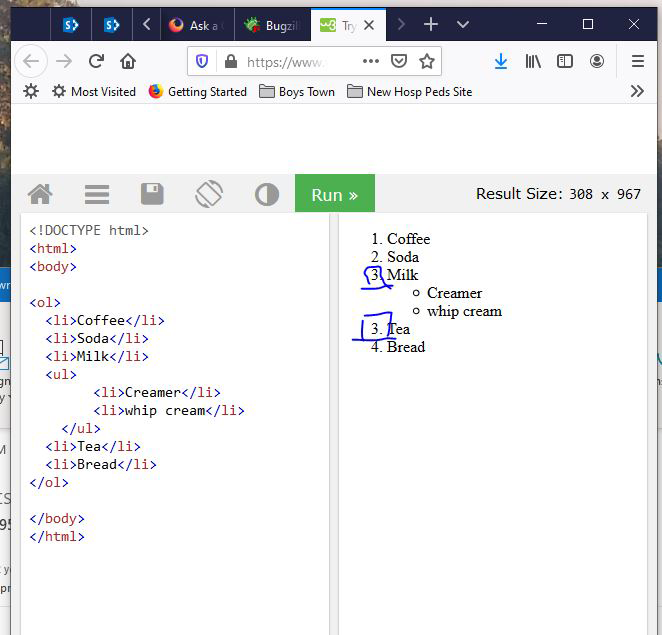
<OL> basic HTML functionality is not working. Create an OL with 3 items, then 2 sub items, then continue the original OL. You'll see: 1,2,3,a,b,3,4,5
Render this in FF.
<ol>
  <li>Coffee</li>
  <li>Soda</li>
  <li>Milk</li>
     <ul>
          <li>Creamer</li>
          <li>whip cream</li>
     </ul>
  <li>Tea</li>
  <li>Bread</li>
</ol>
You'll see it look like the attached screen shot that shows 2- #3 items. Try it yourself is the best way to see the issue. https://www.w3schools.com/tags/tryit.asp
An gyara daga cor-el
Mafitar da aka zaɓa
You've closed the <li> element tag before your nested list is added. This causes this issue because it's the improper way to create a nested list in HTML.
Your second list needs to be within a <li> element.
Your code should look like this:
<ol>
  <li>First item</li>
  <li>Second item
    <ul>
      <li>First subitem</li>
      <li>Second subitem</li>
      <li>Third subitem</li>
    </ul>
  </li>
  <li>Third item</li>
</ol>
Notice that in the above code, the second <ul> element is nested within the Second item
Hope this helps.
Karanta wannan amsa a matsayinta 👍 0All Replies (4)
Zaɓi Mafita
You've closed the <li> element tag before your nested list is added. This causes this issue because it's the improper way to create a nested list in HTML.
Your second list needs to be within a <li> element.
Your code should look like this:
<ol>
  <li>First item</li>
  <li>Second item
    <ul>
      <li>First subitem</li>
      <li>Second subitem</li>
      <li>Third subitem</li>
    </ul>
  </li>
  <li>Third item</li>
</ol>
Notice that in the above code, the second <ul> element is nested within the Second item
Hope this helps.
An gyara daga Wesley Branton
It's strange that the <ul> restarts the counter for the <ol>. No idea why that happens.
<ol>
  <li>Coffee - 1</li>
  <li>Tea - 2</li>
  <li>Milk - 3</li>
     <ul>
          <li>Creamer 1</li>
          <li>Creamer 2</li>
          <li>Creamer 3</li>
          <li>Creamer 4</li>
          <li>Creamer 5</li>
     </ul>
  <li>Soda - 6</li>
  <li>Bourbon - 7</li>
</ol>
But you can avoid it with proper nesting as described in Wesley's reply.
<ol>
  <li>Coffee - 1</li>
  <li>Tea - 2</li>
  <li>Milk - 3
     <ul>
          <li>Creamer 1</li>
          <li>Creamer 2</li>
          <li>Creamer 3</li>
          <li>Creamer 4</li>
          <li>Creamer 5</li>
     </ul>
  </li>
  <li>Soda - 4</li>
  <li>Bourbon - 5</li>
</ol>
Thanks Wesley. Makes sense. Other browsers do correct for the way I had it. But you are correct in that this is the way it should be. :)
This is wrong. An <ul> element can't be a child of <ol> element due to spec.
It should be sth like this: <!DOCTYPE html> <html> <body> <h2>The ol element</h2> <ol> <li>Coffee</li> <li>Tea</li> <li>Milk <ul> <li>One</li> <li>Two</li> <li>Three</li> <li>Four</li> </ul></li> <li>Coffee</li> <li>Tea</li> <li>Milk</li> </ol> </body> </html> See also https://developer.mozilla.org/en-US/docs/Learn/HTML/Introduction_to_HTML/HTML_text_fundamentals#Nesting_lists