


After new installation use old profile

After new installation I want to use my profile of the former installation. In principle I followed the procedure of the article "An einem anderen Ort wiederherstellen". After that when starting thunderbird it always asks me to create a new account.
Does anyone know what is missing?
All Replies (5)

After new installation I want to use my profile of the former installation.
Why did you re-install Thunderbird in the first place?
At the top right of the Thunderbird window, click the menu button ≡, then select Help > Troubleshooting Information. Locate the line 'Profiles' at the bottom of the "Application Basics" information and click the about:profiles link. This will open a new tab showing the about:profiles information. Please post a screenshot. https://support.mozilla.org/kb/how-do-i-create-screenshot-my-problem
Do you see your old profile? If so, you can click the 'Launch Profile' button to load it.
Yes, I can see it and open it. The reason for the new installation is: PC with two partitions with windows installations, one of them crashed (of course the one with the TB on it. I thought, it will be a quick solution to install TB now on the second system..
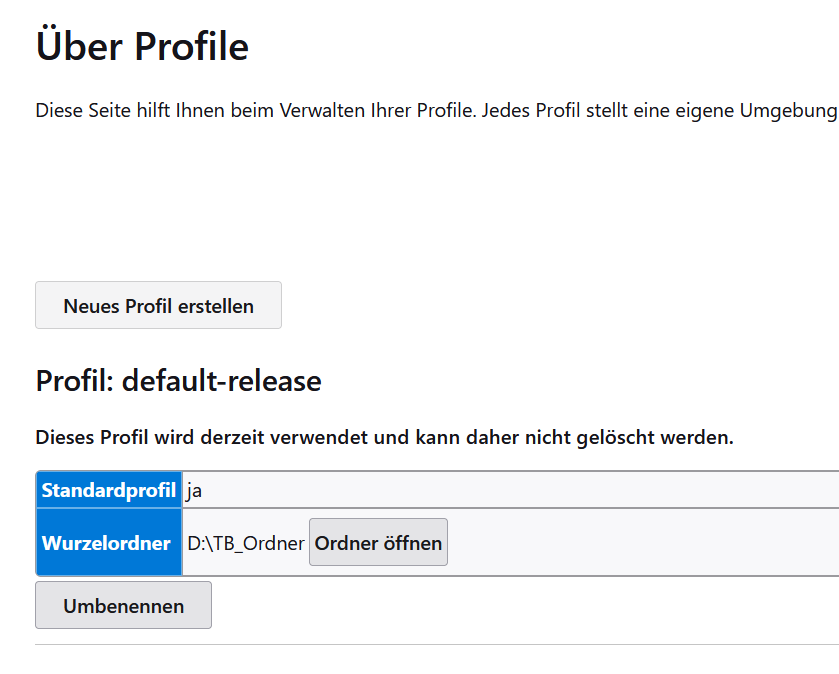
PC with two partitions with windows installations, one of them crashed (of course the one with the TB on it. I thought, it will be a quick solution to install TB now on the second system.
I don't understand this. Windows requires a C: drive. Where is your C: drive? Thunderbird expects the profile information at C:\Users\<your_user_id>\AppData\Roaming\Thunderbird. Please post the contents of your profiles.ini file.
In principle I followed the procedure of the article "An einem anderen Ort wiederherstellen".
What article? Please post a link. Also, please explain in detail the steps you did, including full path information.
PC has two harddiscs, 1 with two partitions (2xwindows), 1 for Data. The profile is on D (data) no problem to link the profile to another disk. Now one of the windows crashes and I installed TB now on the second windows system.
What I did: 1. Install TB 2. Add a new profile and link it to the profile on D. TB does it not recognize, it always prompt for entering an email account.
Second try: 1. Install TB again (before deleting all profiles) 2. Copy all data from the profile on D to the default profile of TB, overwriting all existing data. Same result: TB prompts for an email account.
https://support.mozilla.org/en-US/kb/profiles-where-thunderbird-stores-user-data#w_moving-a-profile
Please post the contents of your profiles.ini file.
Again, what is the contents of your profiles.ini file. That is the one on the second windows system, where you installed Thunderbird.
2. Add a new profile and link it to the profile on D.
How did you create the new profile, and how did you "link it to the profile on D"?