


Latest update, Bookmarks under address bar no longer appear, BLANK LINE ACCROSS

After Latest update, Bookmarks under address bar, NO LONGER APPEAR, ICONS GONE, BLANK LINE ACCROSS, does not copy, drag or paste, must use side bar or shuffle through menu, will revert to default browser if not fixed, new update is totally screwed up, please fix it. THIS PROBLEM ARRIVED SOLELY FROM THE LATEST UPDATE, MIGHT AS WELL USE MICROSOFT BROWSER IF NOT FIXED, LIKE USING A DINOSAUR.
All Replies (3)
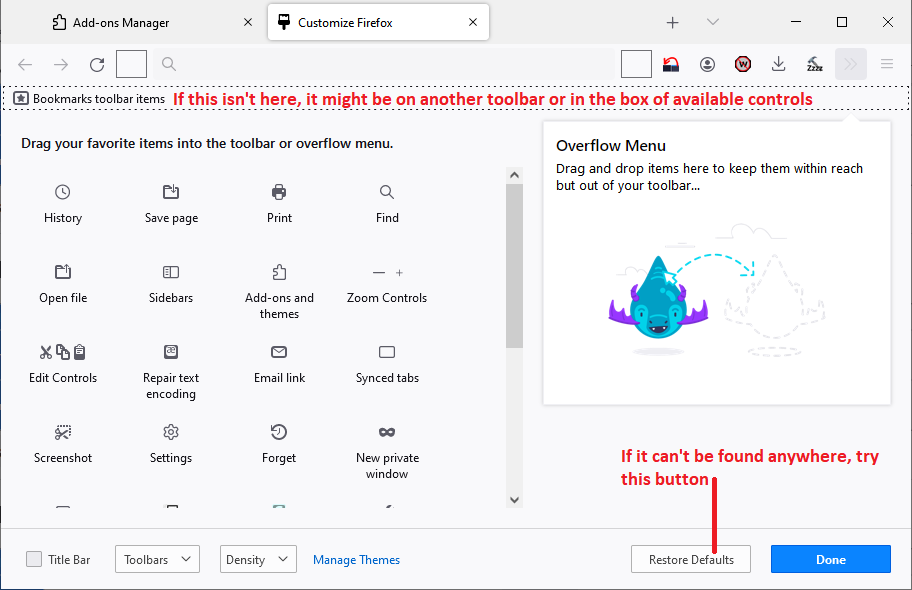
As the first step, could you verify that the "Bookmarks Toolbar Items" control is at the left end of the Bookmarks Toolbar. You need to go into the Customize panel to check this. See: Customize Firefox controls, buttons and toolbars.
Does that make any difference?
Thank you, https://support.mozilla.org/en-US/user/jscher2000/, I signed out of firefox and page returned to normal, I accually have bookmarks behind address bar and a down button over flow, signed out it is back to normal, havent tried signing in again. (A computer literate), just wanted Firefox to be aware it changed on update, Thank you again for your time. PSS... dont want to reset ALL my settings :)
excellent suggestion and thanks