


Windows 10 reached EOS (end of support) on October 14, 2025. For more information, see this article.

Eheka Pytyvõha

Emboyke pytyvõha apovai. Ndorojeruremo’ãi ehenói térã eñe’ẽmondóvo pumbyrýpe ha emoherakuãvo marandu nemba’etéva. Emombe’u tembiapo imarãkuaáva ko “Marandu iñañáva” rupive.

Kuaave

Изменить цвет выделения строки в панели "закладки"

  • 4 Mbohovái
  • 0 oguereko ko apañuãi
  • 62 Hecha
  • Mbohovái ipaháva Denys

jeporavorãve

Сегодня обновил Mozilla FireFox до версии 146.0 (64-разрядный). После обновления в панели "закладки" (cntrl+B) появился ненужный мне цвет выделения только что открытой мною вкладки (смотри скриншот). Как поменять данный цвет на менее контрастный ? У меня включена "темная тема", цвет выделения - ядовито-голубой. Хочу изменить его на другой более мягкий цвет. Как это я могу сделать?

Today I updated Mozilla Firefox to version 146.0 (64-bit). After the update, the highlight color of the tab I just opened appeared in the bookmarks bar (Cntrl+B) in an unwanted way (see screenshot). How can I change this color to a less contrasting one? I have the "dark theme" enabled, and the highlight color is a bright blue. I want to change it to a softer color. How can I do this?
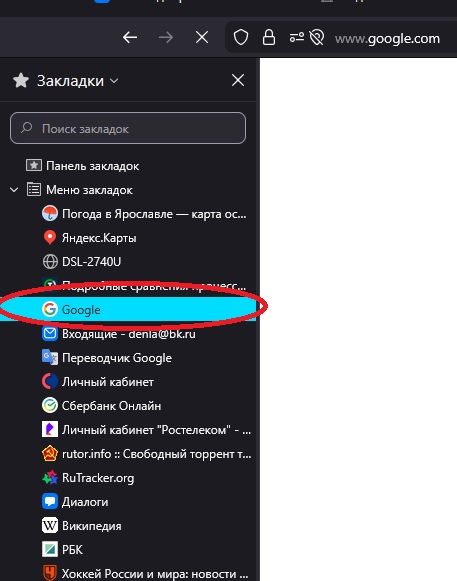
Сегодня обновил Mozilla FireFox до версии 146.0 (64-разрядный). После обновления в панели "закладки" (cntrl+B) появился ненужный мне цвет выделения только что открытой мною вкладки (смотри скриншот). Как поменять данный цвет на менее контрастный ? У меня включена "темная тема", цвет выделения - ядовито-голубой. Хочу изменить его на другой более мягкий цвет. Как это я могу сделать? Today I updated Mozilla Firefox to version 146.0 (64-bit). After the update, the highlight color of the tab I just opened appeared in the bookmarks bar (Cntrl+B) in an unwanted way (see screenshot). How can I change this color to a less contrasting one? I have the "dark theme" enabled, and the highlight color is a bright blue. I want to change it to a softer color. How can I do this?
Mba’erechaha japyhypyre oñondivegua

Opaite Mbohovái (4)

jeporavorãve

Здравствуйте, Денис!

Спасибо за сообщение! Эта проблема рассматривается как баг 2005430. Сейчас план заключается в том, чтобы изменить цвет на более мягкий.

jeporavorãve

Should be already fixed in 146.0.1.

jeporavorãve

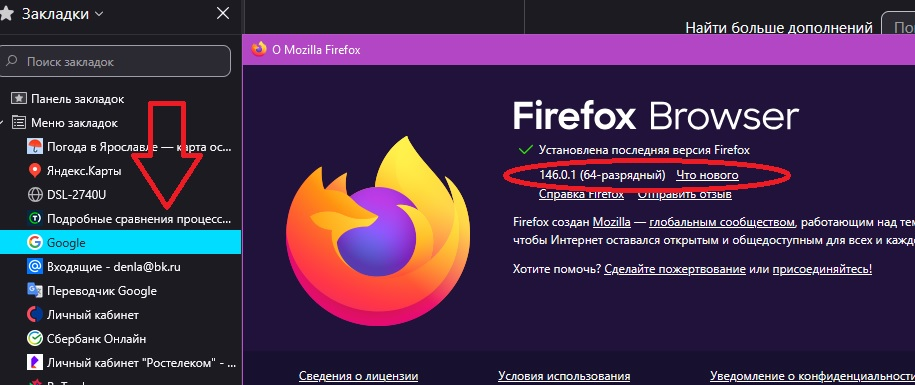
Не помогло. Я обновился до 146.0.1., контрастный цвет не поменялся на более темный. Что я делаю не так?

It didn't help. I updated to 146.0.1, but the contrast color didn't change to a darker one. What am I doing wrong?
jeporavorãve

TyDraniu is wrong, the fix will not land before v147 at least.

Eporandumína

Nde eikéke nde mba’etepe embohovái hag̃ua ñe’ẽmondo. Ikatúpa, emoñepyrũ peteĩ porandu, ndereguerekói gueteriramo nemba’ete.