


The background color of the new tab page replaces the one used by some websites.

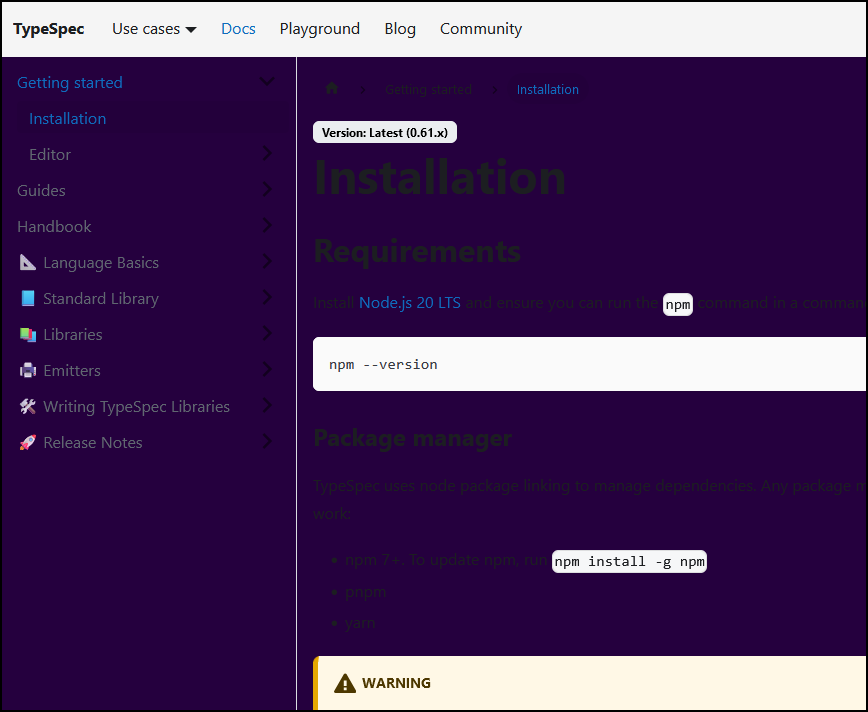
On certain websites, I see that the background color of the new tab page replaces the default background color making the content unreadable, example:
If I browser this website: https://typespec.io/docs
Here's what I see (see the firsrt attached screenshot). Now, if I open the same URL in Private browsing, the background color changes too (see the second screeenshot). In the 3rd screenshot I'm adding the reference rendering, that's how I expect this website to render (Edge).
In the screenshot 1 and 2, the background color is exactly the same as the one used by the new tab page when I open a new tab.
Questions: 1) Why is that? 2) Can I change that?
Context: I'm trying to switch to Firefox (from Edge)


Ñemoĩporã poravopyre
Found it!
I disabled the following setting in "Privacy & Security": Allow Firefox to install and run studies
Websites' background colors are now displayed as they should.
Emoñe’ẽ ko mbohavái ejeregua reheve 👍 1Opaite Mbohovái (4)
How are you setting the background color? Are you changing the default color setting in "Settings -> General -> Language and Appearance -> Colors" as that can cause issues like you posted ?
Note that you can set a wallpaper to the Firefox Home page by clicking the cog icon in the top right corner.
- about:config => browser.newtabpage.activity-stream.newtabWallpapers.*enabled
How are you setting the background color?
I don't know: I don't think I did anything to change the background color of the sites I browse to. I'm adding the screenshot of the setting you suggested.
Note that you can set a wallpaper to the Firefox Home page by clicking the cog icon in the top right corner.
I don't want to change the wallpaper of the Firefox Home Page


I visited that site you posted on Firefox and I get the third image no color background change. And this is with default settings on Firefox.

Ñemoĩporã poravopyre
Found it!
I disabled the following setting in "Privacy & Security": Allow Firefox to install and run studies
Websites' background colors are now displayed as they should.
