


Where are my bookmarks?

Is this some scam to get users to stop using bookmarks and start using something called pocket?
Moambuepyre NoahSUMO rupive
Opaite Mbohovái (2)

Hi, we know you are annoyed, but please don't use offensive language, and no it definitely isn't a scam!
You can remove Pocket by: Right click on the Pocket button in the toolbar > Remove from Toolbar - that will remove it from bookmarks and the toolbar, but it will still be in the menu. To also remove it from there, you then need to type about:config into the address bar, press Enter, accept the warning, scroll down to browser.pocket.enabled and double click to change 'Value' from True to False, taking care not to alter anything else. Then restart Firefox.
For your lost bookmarks, first try restarting Firefox - 3-bar menu > Exit Firefox in bottom right corner.
If that doesn't help, you can try this: Open bookmarks > Show All Bookmarks > Import and Backup > Restore, and see if you have a backup there.
If not, please see -
It's also possible that an extension or theme is interfering, so try Firefox Safe Mode to see if the problem goes away. Firefox Safe Mode is a troubleshooting mode that temporarily turns off hardware acceleration, resets some settings, and disables add-ons (extensions and themes).
If Firefox is open, you can restart in Firefox Safe Mode from the Help menu:
- Click the menu button
 , click Help
  and select Restart with Add-ons Disabled.
If Firefox is not running, you can start Firefox in Safe Mode as follows:
- On Windows: Hold the Shift key when you open the Firefox desktop or Start menu shortcut.
- On Mac: Hold the option key while starting Firefox.
- On Linux: Quit Firefox, go to your Terminal and run firefox -safe-mode
(you may need to specify the Firefox installation path e.g. /usr/lib/firefox)
When the Firefox Safe Mode window appears, select "Start in Safe Mode".
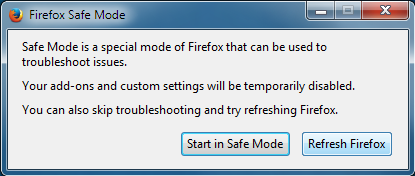
If the issue is not present in Firefox Safe Mode, your problem is probably caused by an extension, theme, or hardware acceleration. Please follow the steps in the Troubleshoot extensions, themes and hardware acceleration issues to solve common Firefox problems article to find the cause.
To exit Firefox Safe Mode, just close Firefox and wait a few seconds before opening Firefox for normal use again.
When you figure out what's causing your issues, please let us know. It might help others with the same problem. Thank you!
Did you lose your bookmarks?
You can check for problems with the places.sqlite database (bookmarks, history) in the Firefox profile folder.
- Places Maintenance: https://addons.mozilla.org/firefox/addon/places-maintenance/
See also:
- http://kb.mozillazine.org/Bookmarks_history_and_toolbar_buttons_not_working_-_Firefox
- https://support.mozilla.org/kb/Bookmarks+not+saved#w_fix-the-bookmarks-file
Did you look for JSON backups?
- Bookmarks > Show All Bookmarks > Import & Backup > Restore
- https://support.mozilla.org/kb/restore-bookmarks-from-backup-or-move-them
- http://kb.mozillazine.org/Backing_up_and_restoring_bookmarks_-_Firefox
If the Places Maintenance extension can't repair the places.sqlite database then remove all places.sqlite file(s) in the Firefox profile folder to make Firefox rebuild the places.sqlite database from the most recent JSON backup in the bookmarkbackups folder.