


I lost my formatting tool bar for Yahoo Mail. How do I get it back?

When I try to download the installation of the format toolbar, it asks if I want to save the file. I click yes and then nothing happens.
Chosen solution
Hi,
I'm assuming by formatting tool, you mean the toolbar used to format text, change font colors, change font size, italicize, bold, etc?
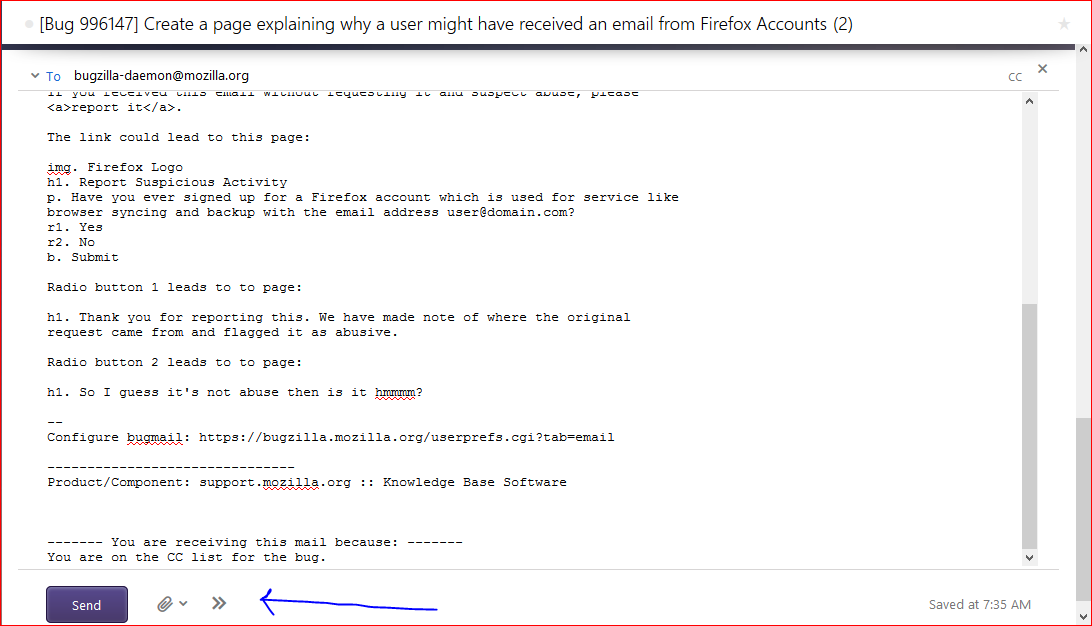
Look at my screenshot attached. When you click the arrow, it should restore it.
If I am thinking about the wrong thing, please let me know and attach a screenshot of what you are talking about.
Ler a resposta no contexto 👍 0All Replies (4)

Chosen Solution
Hi,
I'm assuming by formatting tool, you mean the toolbar used to format text, change font colors, change font size, italicize, bold, etc?
Look at my screenshot attached. When you click the arrow, it should restore it.
If I am thinking about the wrong thing, please let me know and attach a screenshot of what you are talking about.
Thank you for this- I managed to get the screen shot of the formatting tool (yes the one which gives options of font, color, bold, etc) but I cant get it to move it to a toolbar above or below the email box. Any other ideas?Thank you! AHWG
I don't think you can. I've checked through the Settings myself previously and couldn't find anything.
thanks for your efforts!