


how do I deinstall amazon asssist add on?

I want to remove the amazon assist toolbar
Chosen Solution
I'm guessing what you say is most likely the cause. I can't remember installing them direct from Amazon, but its possible that's what happened and I just forgot. Since this is a stale end a long time later, lets just call it done.
All Replies (9)
If it installed as an add-on, you should be able to disable or remove it here:
orange Firefox button or Tools menu > Add-ons > Extensions category
Can you find it?
I see a way to install but don't see a way to deinstall.
I'm running firefox 5.0 and see no way to deinstall
I think maybe you weren't in the Extension category. See the attached screen shot.
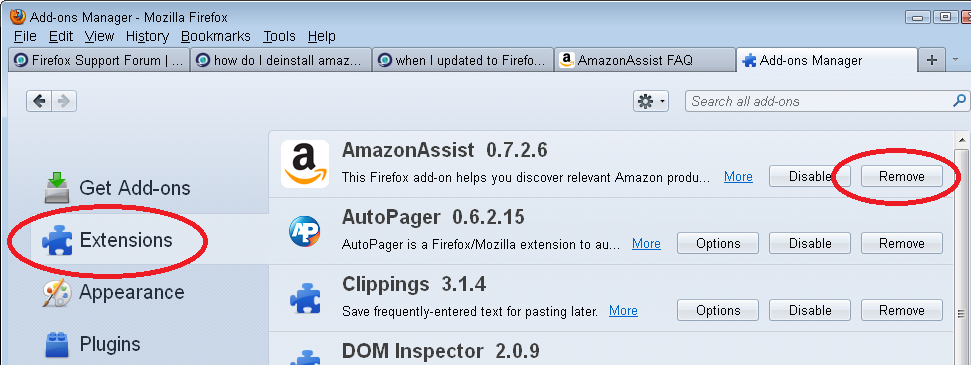
What an idiot I am! Thank you.

Once I found Extensions it was easy to remove Amazon. I just found it too intrusive.
I'm having a worse problem. I never remeber having or installing Amazon toolbar on 8.0.0 Firefox (Mac OS 10). But after downloading FF 8.0.1, suddenly there are two new icons in the toolbar, kindle-related (send to kindle, read now) and there are NO addons or extensions related to Kindle or Amazon: there is nothing I can Disable that I see to make these buttons go away. If I edit the toolbar, these buttons can be moved away but dragging them off-screen or to the trash DOES NOT REMOVE THEM. I tried installing Amazon toolbar, then disabling it, then uninstalling it, and these buttons are still with me. HELP! I really don't want them and FF seems to think I must have them no matter what.
OK, looks like the icons CAN be removed if I drag them to empy area of the View -> Toolbars -> Customize selection window. Can't drag them to trash, can't drag them off-window, but removes them if dragged back off the toolbar and into the selection window. Whew.
Only question I have, is WHY did two Kindle tools get added to Mozilla in 8.0.1, and WHY did they get put into my toolbar by default. Or maybe they there the whole time and I just didn't see them (off the right end on a pull-down list or something)?
Hi rj_oregon, have you installed any other software from Amazon? Perhaps we can track down the most likely culprit.
Chosen Solution
I'm guessing what you say is most likely the cause. I can't remember installing them direct from Amazon, but its possible that's what happened and I just forgot. Since this is a stale end a long time later, lets just call it done.