


TB 155 & Folder Message Count: dash instead of nothing when the folder is empty

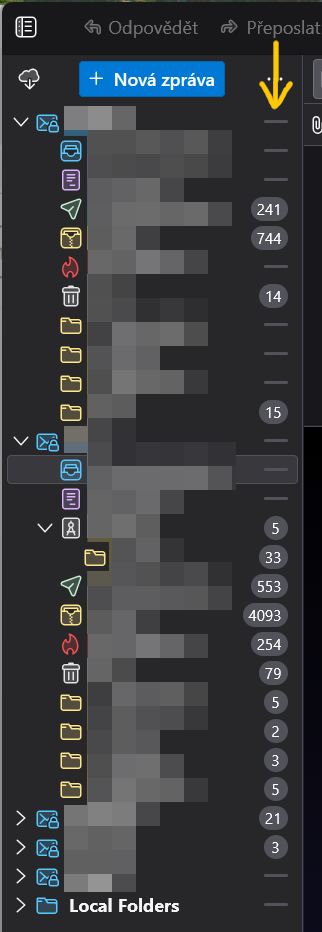
In TB prior to v.155, folder message counts were not shown at all if the respective folders were empty. That is, instead of showing "0", TB did not show anything.
Now, after updating to TB v.155.0.1, I see dashes (horizontal lines) in the folder tree to the right of each empty folder.
Is it possible to revert back to the original behaviour and get rid of those unsightly dashes? They only add visual clutter (my opinion, obviously) while not providing any extra information.
Thanks.
Chosen Solution
You cannot get rid of those 'dashes' unless the bug is confirmed, a fix is written and included in a future update by the Thunderbird team. That's how things are working....
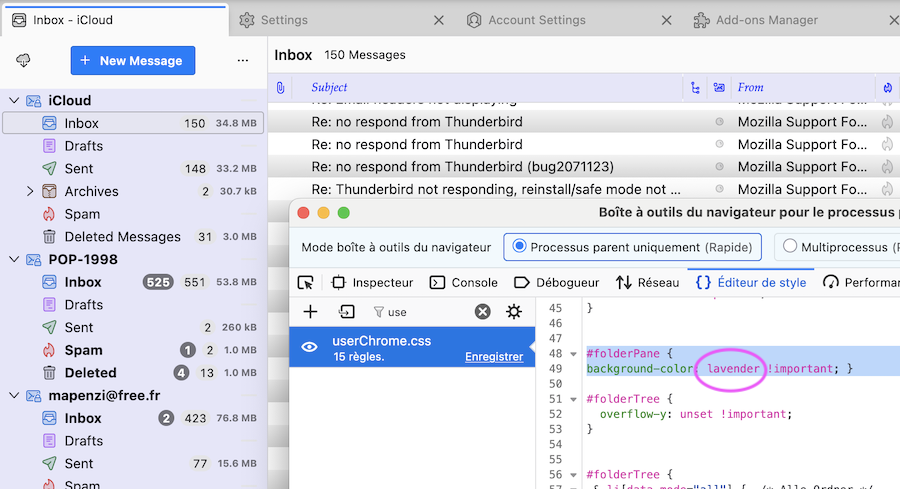
BTW, by chance I just found a workaround: I opened one of my Thunderbird test profiles and didn't notice any dashes in the folder pane (see image) I'm using the "system theme" and some CSS codes in a userChrome.css file to put some background color in the folder pane. The background color I'm using for my folder pane is 'lavender', and obviously it is this color which "covers" the unwanted dashes.
EDIT: I found an even better workaround with a CSS snippet here ↴ https://forums.mozillazine.org/viewtopic.php?t=3140767
Mapenzi modificouno o
All Replies (6)
It is strange but suddenly, TB started showing "0" (again, _de facto_ unnecessary information) for one of the inboxes. Other empty folders are still with dashes.
A bug has been filed for this issue https://bugzilla.mozilla.org/show_bug.cgi?id=2068468
Ah, I see, thanks.
But the original question still stands: can I get rid of those dashes (or zeros) so that message counts are shown only for non-empty folders?
blue.chip modificouno o
Chosen Solution
You cannot get rid of those 'dashes' unless the bug is confirmed, a fix is written and included in a future update by the Thunderbird team. That's how things are working....
BTW, by chance I just found a workaround: I opened one of my Thunderbird test profiles and didn't notice any dashes in the folder pane (see image) I'm using the "system theme" and some CSS codes in a userChrome.css file to put some background color in the folder pane. The background color I'm using for my folder pane is 'lavender', and obviously it is this color which "covers" the unwanted dashes.
EDIT: I found an even better workaround with a CSS snippet here ↴ https://forums.mozillazine.org/viewtopic.php?t=3140767
Mapenzi modificouno o
Thank you, I understand how software development works, but I -- erroneously -- thought that by "[bug has been filed for] this issue" you meant the issue being the change of a dash to a zero, not that these are shown at all.
Anyway, the second workaround from mozillaZine worked nicely. :)

Мапенці said
You cannot get rid of those 'dashes' unless the bug is confirmed, a fix is written and included in a future update by the Thunderbird team. That's how things are working.... BTW, by chance I just found a workaround: I opened one of my Thunderbird test profiles and didn't notice any dashes in the folder pane (see image) I'm using the "system theme" and some CSS codes in a userChrome.css file to put some background color in the folder pane. The background color I'm using for my folder pane is 'lavender', and obviously it is this color which "covers" the unwanted dashes. EDIT: I found an even better workaround with a CSS snippet here ↴ https://forums.mozillazine.org/viewtopic.php?t=3140767