


Does the signature URL need to be a certain format for it to pull a jpg from web hosting?

" attach the signature from a file instead "
I put the URL in there and it does not retain it and use it as signature image. It is a jpg. It browses in a URL on my browser and loads fine but T/B refuses to allow it.
Suggestions ?
Chosen solution
I think you may have been mixing URLs with HTML. You were putting a URL in the sig, but it needed HTML, and the HTML file was yet another wrapping of HTML. An HTML email is just an HTML web page, so anything referenced must be embedded with HTML tags. I hope my solution worked for you. :)
Ler a resposta no contexto 👍 1All Replies (15)
You need to post the exact HTML that you use for anyone to gave feedback. Accessing a jpg is just providing the proper HTML link. I suggest starting with just a screenshot and then possibly more if difficult see. The screenshot should be 100% of the sig.
There's nothing to screen shot though, because it does not stay in the " attach the signature from a file instead " field when I exit the menu. I'm not using HTML, I'm just pointing to a JPG file.
If I put it on a file and on my computer it works fine. But it wont work from a URL with the same jpg or html file if I use an html extension.
JJTX modificouno o
You need HTML to use the jpg. That file you're attaching needs to have HTML.
david said
You need HTML to use the jpg. That file you're attaching needs to have HTML.
I've tried two separate URL's in the field. One was just a url to the jpg file. The other was a URL to an .HTML file, neither will remain in the field once I leave the menu and it wont pull that from the web hosting.
If you are linking to a file for the HTML sig, then open the file and do a screenshot of its contents.
I have included two screenshots that show basics of including a jpg, one from PC and one from a website. What you shared seems incomplete. My hope is that you can use my examples. This is not a thunderbird problem. Good luck.
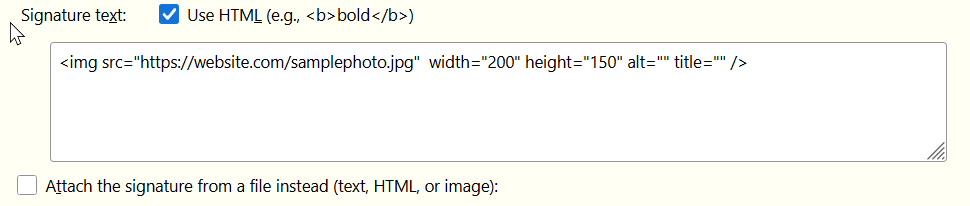
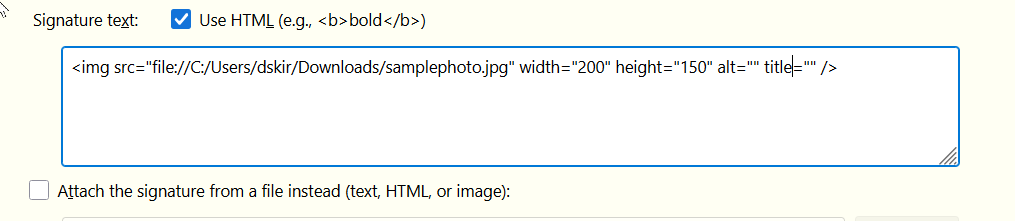
I used your exact string in my hosted HTML file and updated the URL to the jpg.
No matter what I do, when I put the URL in the ATTACH THE SIGNATURE FROM A FILE INSTEAD field, it does not "STAY" inputted.

Aha! The HTML file must be on your PC, not the web. If it still doesn't work, then we need to see the contents of signature.html
david said
Aha! The HTML file must be on your PC, not the web. If it still doesn't work, then we need to see the contents of signature.html
I thought I was more clear about that. I want it web hosted and not on my desktop.
From thunderbirds help files
"""In addition to selecting the image file, use this dialog to configure other aspects of the image, such as the size, a URL link, its position with regards to the text, etc.
You can also specify an image located on a web server as part of your attachment. Simply specify the image URL in the field where you would otherwise specify the file name. If you check "Attach this image to the message" the image will be included as an attachment. If you do not attach the image, message recipients must have an internet connection to view the image. Also, keep in mind that for security reasons many people configure their email programs to block remote content, which would prevent the image from displaying unless it was attached to the message."""""
The image may reside on web, but thunderbird needs an HTML link TO the URL that has the image, not just a URL. The attached screenshot does exactly what you want. it is an HTML link to your image on the website.

Chosen Solution
I think you may have been mixing URLs with HTML. You were putting a URL in the sig, but it needed HTML, and the HTML file was yet another wrapping of HTML. An HTML email is just an HTML web page, so anything referenced must be embedded with HTML tags. I hope my solution worked for you. :)