


Cannot import data to Thunderbird address book

Just started using Thunderbird, coming from MS Outlook. I have exported my contact details in Outlook to a .csv file, and tried to use this as the import source to transfer the details to Thunderbird address book. I have checked the fields to transfer, but none end up being passed over. The .csv file appears to hold the correct data with the correct field headers. Although I do not have many contacts, transferring them individually by hand seems a very old-fashioned thing to have to do lol
Chosen solution
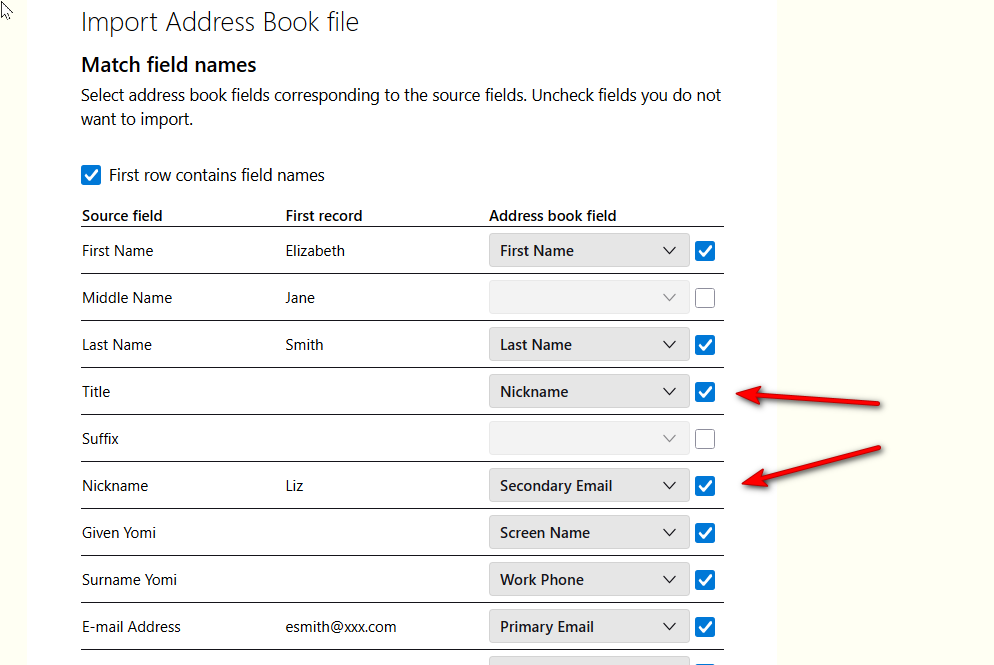
If useful, I attached a sample screenshot, showing a mismatch if nickname. FIxing it would require unticking the boxes first, and then adjusting the dropdown menu. However, if that isn't working for you, an option is to go the spreadsheet way. Here are sample steps that many have found successful:
- enter one good email address with fields you normally use into thunderbird's addressbook
- click the three dots to the right of addressbook name and export in csv format. This will be your template
- open that export into a spreadsheet program
- note the top row. this shows the columns as thunderbird expects them to be
- open your exported outlook csv into spreadsheet and adjust columns to match, including the top row.
- save as csv
- import into thunderbird
All Replies (5)
Try this: Use the Thunderbird import for CSV at tools>import>import from a file if a screen opens to show selected fields for the import, this happens because Thunderbird senses that mapping is needed.
- untick the fields that are either incorrect or not desired for the import
- next, use the drop-down menu on each desired incorrect mapping and select the appropriate entry. For example, in the attached screenshot, the Nickname is incorrectly assigned to Title, and the true nickname is assigned as Secondary Email. Resolving this is a simple as clicking the drop-dpwon menu and selecting the Nickname option.
- once all corrections are done, click the submit button.
Hi David, thank you for the quick reply. This is what I had been doing, without success. I have tried again, and confirmed that the field to transfer are ticked, and that the field names in the Outlook file match those presented in the dropdown matching list shown by Thunderbird. Unfortunately, the same result; the names are mapped but none of the other details. I did try opening a new address book in case it was balking at the names being there already. I had used the import button at the bottom of the address book list, but also went via the Menu>Tools>Import option at the top right corner of the TB page. None of these have worked. I will edit them manually as there are only a few dozen. Thanks Peter
Chosen Solution
If useful, I attached a sample screenshot, showing a mismatch if nickname. FIxing it would require unticking the boxes first, and then adjusting the dropdown menu. However, if that isn't working for you, an option is to go the spreadsheet way. Here are sample steps that many have found successful:
- enter one good email address with fields you normally use into thunderbird's addressbook
- click the three dots to the right of addressbook name and export in csv format. This will be your template
- open that export into a spreadsheet program
- note the top row. this shows the columns as thunderbird expects them to be
- open your exported outlook csv into spreadsheet and adjust columns to match, including the top row.
- save as csv
- import into thunderbird
Great, David, thank you very much. I was able successfully to import all my contacts. Cheers!