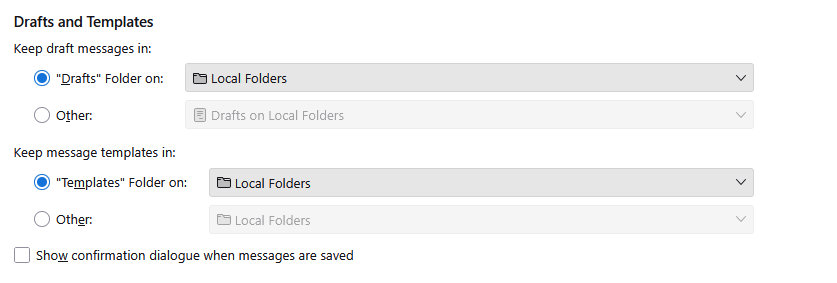
when I click on a message in my inbox it now wants to send it/compose it as a message instead of reading the message

Hi, I dont know what setting I have accidently changed but before I used to double click a new message in my inbox on local folders and now instead of reading it full screen now it wants to send it as an email message to someone!
Any ideas to put it back to just read the email and not compose a message with it?
Thanks.
I dont remember having this 'new message template' thing before when I right clicked on a message in my inbox , maybe thats what the issue is?
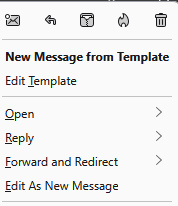
Chosen solution
update: - I changed it to this and it seemed to have done the trick. thanks everyone.
Ler a resposta no contexto 👍 0All Replies (6)

Hi Andy.
This is happening in your inbox, not in a templates folder?
Look in account settings > Copies & Folders > Drafts & Templates. What folder do you have set to be your templates folder? To be your drafts folder?
Rick modificouno o
Rick said
Hi Andy. This is happening in your inbox, not in a templates folder? Look in account settings > Copies & Folders > Drafts & Templates. What folder do you have set to be your templates folder? To be your drafts folder?
Thank you here is what it is set at:
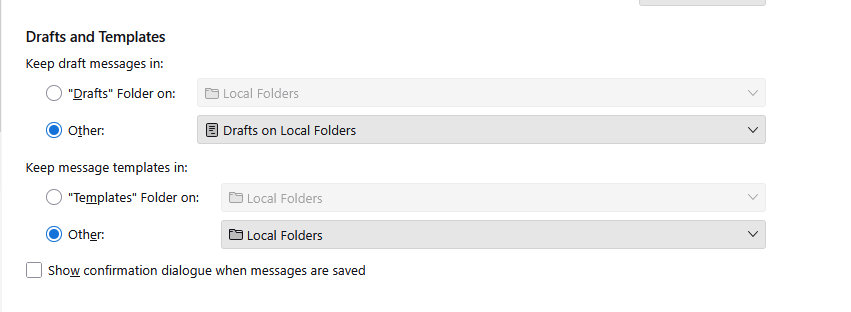
This is happening in your inbox, not in a templates folder? Or a drafts folder?
I do not know what else to consider other than sfhowes' link.
You may want to have a dedicated templates folder instead of "Other".
sfhowes said
See https://support.mozilla.org/en-US/questions/1460237
Thank you for that .
when I click properties I dont get all those options on mine which is strange:
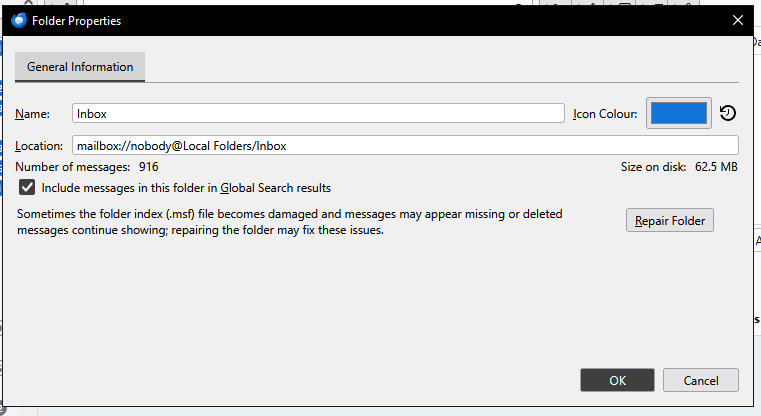
Chosen Solution
update: - I changed it to this and it seemed to have done the trick. thanks everyone.