


Menu bar changes in v140.0.1esr eclipse

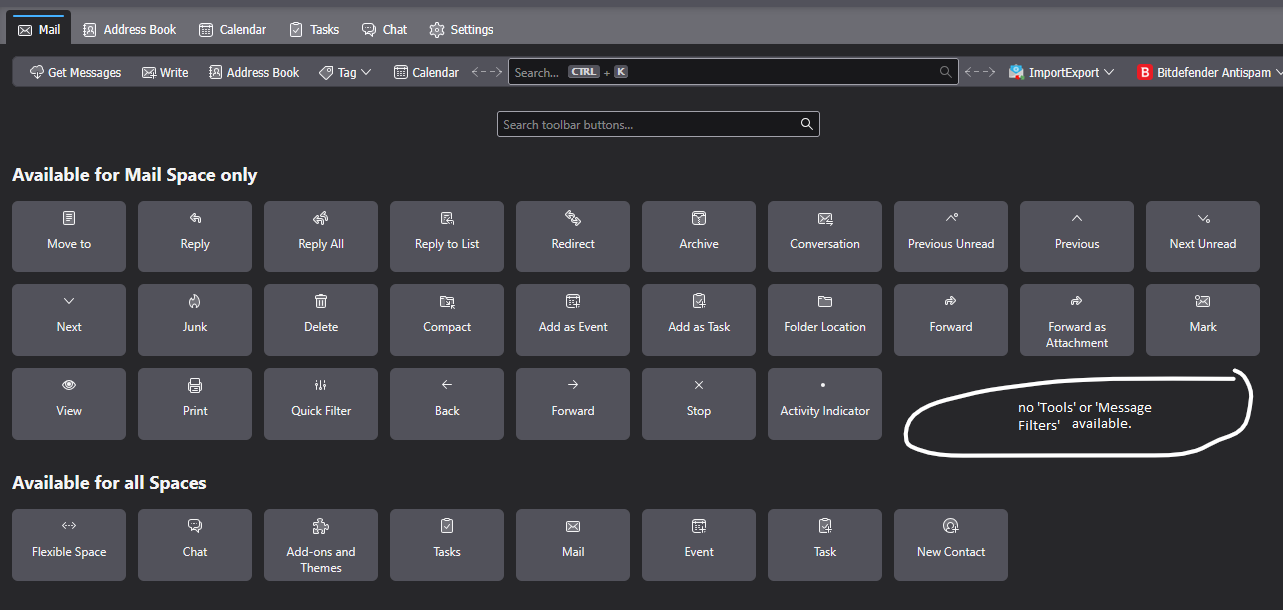
In the new 140.0.1esr eclipse version the menu bar has lost Tools. When I right click and go to "Customize toolbar" there is not an option to add either 'Tools' or 'Message Filters', the later being what I would prefer to add to the tool bar (see attached image). I now have to click the hamburger icon -> select Tools -> Message Filters. If I could add 'Tools' or 'Message Filters' into the menu bar (for Mail messages since there are segregated menu bars now) it would be so much easier. I use the Message Filters function frequently so having to go through several steps to get to it now is very inconvenient in this new version.
Chosen solution
The toolbar you're trying to customize is actually the Unified bar. If the Menu Bar with Tools is hidden, press Alt and make it permanently visible under View/Toolbars.
Ler a resposta no contexto 👍 2All Replies (1)
Chosen Solution
The toolbar you're trying to customize is actually the Unified bar. If the Menu Bar with Tools is hidden, press Alt and make it permanently visible under View/Toolbars.