

Este fío arquivouse.
Faga unha nova pregunta se precisa axuda.

Solved
Arquivado
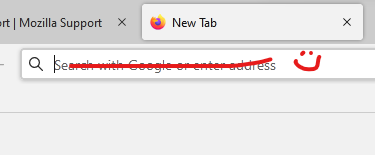
remove the hint in the address bar
Hi, is there a way to remove the hint in the address bar - "search with ... or enter the address", leave only the blinking cursor? thanks.
Hi, is there a way to remove the hint in the address bar - "search with ... or enter the address", leave only the blinking cursor? thanks.
All Replies (3)
thank you for your answer, I have userContent.css to improve the design of firefox, can you suggest a solution?
Chosen Solution
That is the placeholder text that shows the action for the default search engine. Note that CSS code for the user interface goes in userChrome.css, userContent.css is for styling webpages including built-in about pages.
Add CSS code to the userChrome.css file in the chrome folder in the Firefox profile folder. Either of the two codes should work to hide this text.
#urlbar *|input::placeholder {
 color: transparent !important;
 opacity: 0 !important;
}
#urlbar *|input::placeholder:hover {/* add code to override this on hover */}
Thank you, cor-el !