


Opening PDF does not autoselect option when asking for action

Hello,
I am using Thunderbird on both Linux and Windows and ran into the same problem on both OS after installing updating to Version 91.5.0.
Under preferences I have "Always ask" enabled for PDF-Files because I want to be able to choose the action depending on the document. I have the same config for Docx-Files.
When I click on a pdf - it opens a promt where I am asked what I want to do with the document - "Open with" or "Save" and no option is pre-selected. If I then press enter, nothing happens. I have to manually click on one of the two options and then press enter or "OK" to confirm the action.
With docx for example, it works perfectly. I get the same prompt but "Save File" is pre-selected. I can press enter and another prompt about the saving location opens.
I am guessing this is a bug since I only found this issue with Pdf-Files but if it is not, please let me know where to configure this option so it auto-selects "Save File" in the prompt.
Thanks in advance for any answer!
- AZ
Chosen solution
My bug report: https://bugzilla.mozilla.org/show_bug.cgi?id=1751900
First bug report about this: https://bugzilla.mozilla.org/show_bug.cgi?id=1749757
Since the devs know about this and it will be fixed with a coming stable.version, this issue is resolved for me.
Thank you again for the support david!
BR
Ler a resposta no contexto 👍 0All Replies (14)
Are you referring to a Windows setting or a TB setting? I don't see one for DOCX. TB has a preview feature for PDF, but you may prefer to use whatever PDF utility you have installed. I'm referring to setting in Tools>Preferences>General.
I am referring to a thunderbird setting! I have "Action" for PDF-Files set in Tools>Preferences>General>Files & Attachments set to "Always Ask". When the ask-prompt opens, there is not option pre-selected when it is a PDF-File.
There might not be a specific option for Docx-Files but the promt that appears when opening one still autoselects an option.
Screenshots are attached:
The "Open with Okular" is the PDF one - if I press enter in this prompt nothing happens
The "Open with LibreWriter" is the docx one - if I press enter there, it opens another prompt where it askes for saving location.
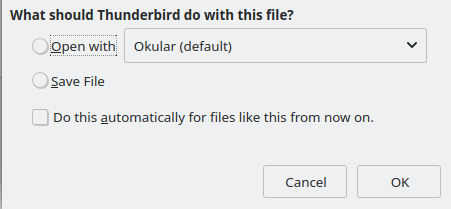
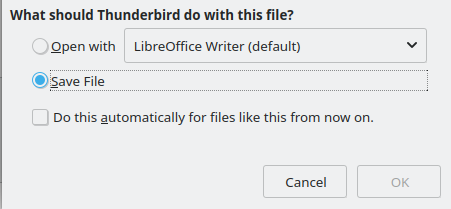
It IS giving you an option: Ocular. I don't know anything about Ocular. I have a PDF reader (Foxit) and my test works. The problem may be with Ocular and whether it is designed to be invoked from another application.
The problem is not the program! Is could say any program there and still would not work. My problem is that the box (from the screenshot) does not autoselect any of the two options ("Open With XXX" or "Save File").
I tested it on different OS with different pdf-programs, no difference.
TB is doing exactly what you wanted - always ask. The LIbreoffice prompt is 'save' because TB has no info on that and is defaulting to the Windows setting. If you want TB to do something, such as save or open with a specific program, then specify that. Another option you have is 'preview in Thunderbird', which lets you quickly view content and there is a save icon in upper right. You are wanting it to ask, but also have a suggestion. That is not an option.
Again, this was not an issue before the update so no, it is not doing what I wanted.
For testing, I have configured the settings for PlainText File in TB the same way I have PDF configured. Output is shown in the screenshot. All three files have been clicked on in the attachment!
Left = txt-File Middle = PDF-File Right = DOCX-File
You are telling me that it is supposed to preselect like this? When my settings are "always ask" for all three?
Screenshot from TB-Settings also attached.

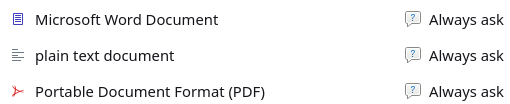
I'm trying to work with you. I have these separate TB setups and all three show what I shared. However, your settings may be different. DOCX and plaintext aren't part of the defaults, so how are you adding them to the tools>preferences>General tab?
I am too - sorry if I came off as rude!
I see what you mean now. The settings for docx, txt, etc are only on my Thunerbird on Linux. My windows setup only has an option for pdf.
I don't recall adding them manually - either thunderbird asked me what to do with these certain types of files or the setting was taken from my system.
I understand what you are saying about the settings but I am still 100% sure, that this was either removed with the update or is a bug.
When the update dropped (I'm not 100% if it was the current one - it first occured on the 3rd of Jan) I had one TB updated and one not updated. The non-updated version checked one of the two boxes and the updated one did not.
After updating the other TB as well, they both had this problem.
Oh and the both TB (one updated one not) from the 3rd of Jan were both windows installations.
well, I wish I could find more information for you, but I cannot. What works there seems to be the only option. I did determine that these settings are in the file handlers.json, a text file that you may want to browse for more insight, but even there it defaults to Windows settings. Anyway, I wish you well and regret I couldn't help you set this to your preference.
Thank you anyways for trying!
For your Info - if you are interested
I checked the handlers.json file on both linux and windows. I had no luck with editing it, tried a couple of different "action" values. After a certain point of changing values, the file just kept resetting itself.
Also for your question about how I have all these settings on my linux-pc, here is the handlers.json from my linux installation:
{"defaultHandlersVersion":{},"mimeTypes":{"application/pdf":{"action":4,"extensions":["pdf"],"ask":true},"text/calendar":{"action":0,"ask":true,"extensions":["ics","icz"]},"application/vnd.openxmlformats-officedocument.spreadsheetml.sheet":{"action":0,"ask":true,"extensions":["xlsx"]},"text/xml":{"action":0,"ask":true,"extensions":["xml","xsl","xbl"]},"application/x-zip-compressed":{"action":0,"ask":true},"application/vnd.ms-publisher":{"action":2,"ask":true,"handlers":[{"name":"Kate","path":"/usr/bin/kate"}]},"text/plain":{"action":2,"ask":true,"handlers":[{"name":"Kate","path":"/usr/bin/kate"},{"name":"draw.io","path":"/usr/bin/env"}],"extensions":["asc","txt","text","pot","brf","srt"]},"application/vnd.openxmlformats-officedocument.wordprocessingml.document":{"action":0,"ask":true,"extensions":["docx"]}},"schemes":{}}
What I have also tested, was downloading TB Version 9.0 from https://archive.mozilla.org/pub/thunderbird/releases/
The problem I described does not occur in this version (on windows). When I click on a pdf-attachment in TB 9.0 it opens the same prompt as before, just with "Open with" already selected, so I just have to hit enter.
Also I didn't find the handler.json file for 9.0. I'll mess around with it a little more and report here if I find a fix
Problem occurs when updating to 91.4.1.
91.4.0 is working - 91.4.1 is not. I also don't think handlers.json is the solution - I used the same profile in 91.0, 91.4.0 and 91.4.1 and the file did not change at all.
For what it's worth, 91.5.1 shows selection with no default. 97.0b3 shows selection with Save highlighted as the default. I'll close at this. All the best to you in this.
Chosen Solution
My bug report: https://bugzilla.mozilla.org/show_bug.cgi?id=1751900
First bug report about this: https://bugzilla.mozilla.org/show_bug.cgi?id=1749757
Since the devs know about this and it will be fixed with a coming stable.version, this issue is resolved for me.
Thank you again for the support david!
BR