

Este fío arquivouse.
Faga unha nova pregunta se precisa axuda.

Solved
Arquivado
Thunderbird Inbox display shows wrong emails when clicked

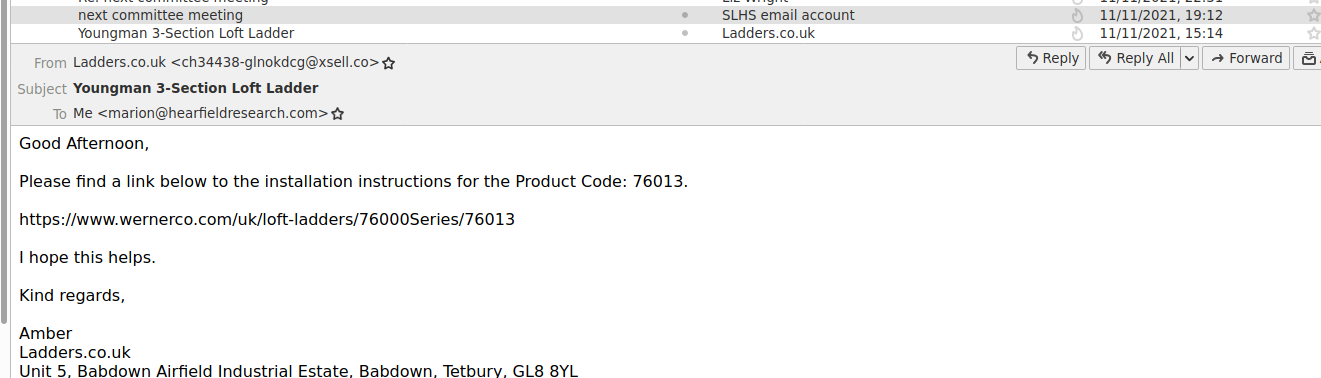
Thunderbird inbox has started showing the contents and sender of the email below, when I click on an email to re-open it (image attached - click on email about from SLHS and see email about ladder installation!). Noticed it yesterday (15 Nov 2021). The error persists when sorted by Subject or Correspondents and right now all my Inbox entries earlier than today's are misaligned, down to 13 Sept, then they are OK again. What has happened! How can I stop it? I run Tbird on a Linux Mint Cinnamon 19.3 PC. The error doesn't happen when I look at the same emails on my Kindle. Thanks MarionH
Thunderbird inbox has started showing the contents and sender of the email below, when I click on an email to re-open it (image attached - click on email about from SLHS and see email about ladder installation!). Noticed it yesterday (15 Nov 2021). The error persists when sorted by Subject or Correspondents and right now all my Inbox entries earlier than today's are misaligned, down to 13 Sept, then they are OK again. What has happened! How can I stop it? I run Tbird on a Linux Mint Cinnamon 19.3 PC. The error doesn't happen when I look at the same emails on my Kindle. Thanks MarionH
All Replies (1)
Chosen Solution
Right-click the folder, Properties, Repair Folder, to rebuild the folder index that connects Subjects with message bodies.