


SVG text on curved path is not laid out as expected if letter-spacing / word-spacing given
I have some SVG text on an arc which I think should be centered symmetrically on the arc - I am using text-anchor='middle' and startOffset='50%'. However, in Firefox the text appears rotated slightly counterclockwise from where I expect it to appear.
I think this problem may be something to do with the text-spacing or the word-spacing setting that I am using (both spacings are expanded) - it seems okay if these are not specified.
How do I make it left-right symmetrical, and why does the same page seem okay in other browsers (is Firefox deliberately different, or is there, as I suspect, a bug?)
Sample web page showing problem
Any ideas?
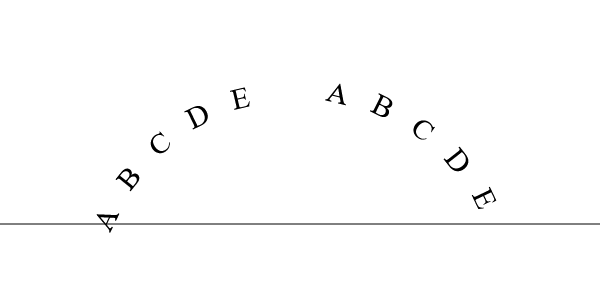
Steve Lelievre modificouno o
Chosen solution
It may be a buggy text-spacing in Firefox. You can file a bug here: https://bugzilla.mozilla.org/enter_bug.cgi
You can also try out<text textLength="500px">instead of text-spacing. Ler a resposta no contexto 👍 1
All Replies (2)
Chosen Solution
It may be a buggy text-spacing in Firefox. You can file a bug here: https://bugzilla.mozilla.org/enter_bug.cgi
You can also try out<text textLength="500px">instead of text-spacing.
I found that TyDraniu's suggestion of using <text textLength="NNNpx"> solves the problem, close enough. However, it turns out that Google Chrome wants the textLength to apply to the contained textPath element instead of the text element, so I have to give it in 2 places - each browser ignoring one or the other.
With that addition, the layouts are nearly identical but not perfectly so - but good enough for my purposes.