My Thunderbird Folder "Cabinet" is grayed out and cannot open?

I had stored many emails in a folder called Cabinet. It has become "grayed out" and I cannot open it. How can I retrieve the contents?
All Replies (4)
Can anybody help please? Cheers, Vic
Greyed out italic folder have a no-select flag on them. A couple of options to try.......
If the top level folders are grey italic eg: 'Cabinet', but it's subfolders are not. This may mean the subfolders are subscribed to but the main folder - Cabinet is not. Subscribe to the 'Cabinet' folder again.
- Right click on mail account name in Folder Pane and select 'Subscribe'
- click on 'Refresh'
- Select 'Cabinet' folder
- click on 'Subscribe' button
- click on 'OK'
Also try this:
Rename the 'Cabinet' folder to eg: CabinetX
Then rename it back to original name.
Restart Thunderbird.
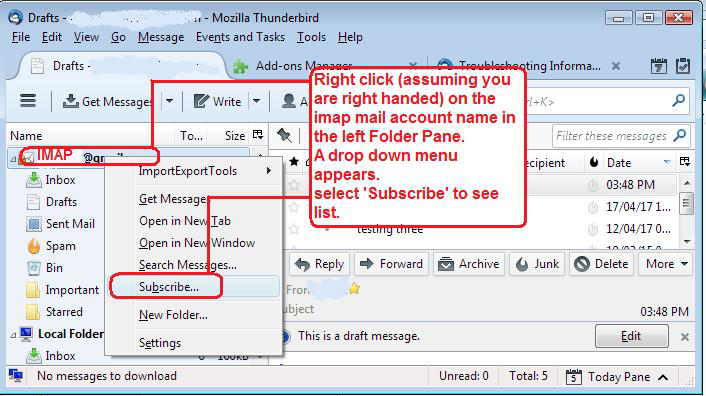
Many thanks Toad-Hall. Not sure what is meant by: "mail account name in Folder Pane" to then select 'Subscribe' . If I right click on the Grayed Out "Cabinet" I get a list of options, but "Subscribe" is not one of them. Hope you can help further.
Cheers, Vic
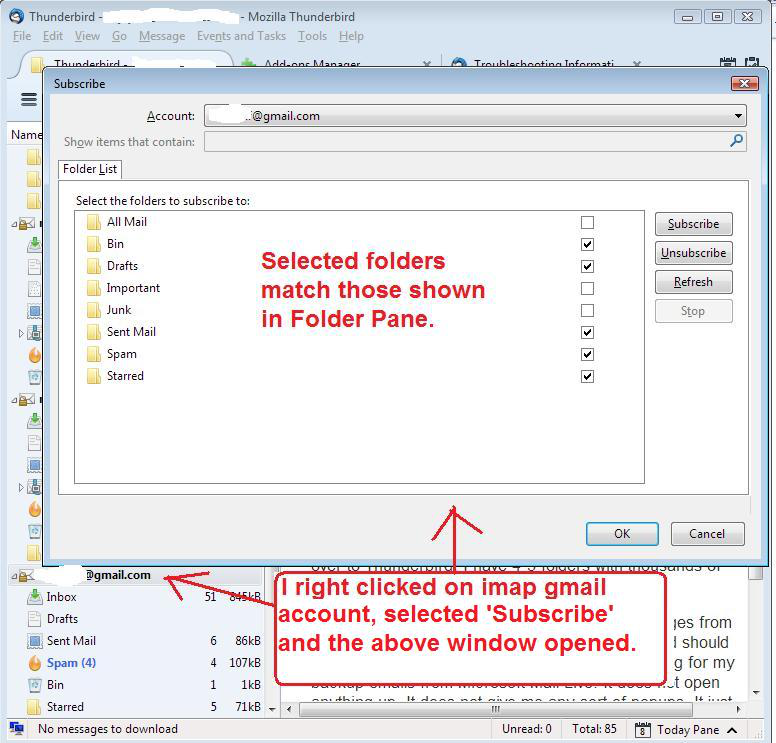
re :"mail account name in Folder Pane" In the left Pane - aka 'Folder Pane' you will have your 'mail account name' - usually your email address and below that name will be Inbox and all other folders. See image as guide.
Right click on that 'mail account name' which is an imap account and select 'Subscribe' A new pop up window appears with list of folders. See second image below as guide. click on 'Refresh' Select 'Cabinet' folder click on 'Subscribe' button click on 'OK'