


Unenble access website without secure http(https) due to Personal Security Manager is not installed

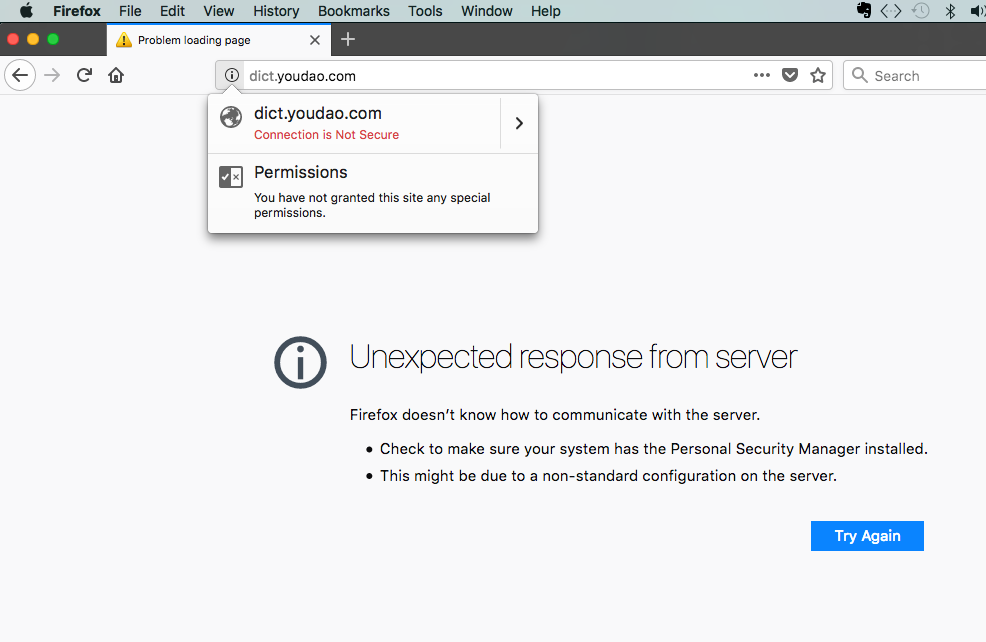
I just upgrade firefox to 57.0 (mac os). However, If I access any web site without secure http(https), for example: http://http://dict.youdao.com/ . Firefox will forbid it, display the following information:
Unexpected response from server Firefox doesn’t know how to communicate with the server. Check to make sure your system has the Personal Security Manager installed. This might be due to a non-standard configuration on the server.
It is too inconvenient. How to I solve it?
Chosen solution
Thank you for all above help very much.
I find a solution finally. I notice a link in mozilla accidentally to refresh firefox, and do as so. It really works. It is regretted I can not find the link again.
However, I found a similar url about how to refresh firefox settings as follow:
Thanks again.
Steven
Ler a resposta no contexto 👍 0All Replies (6)

I had no problem with http://dict.youdao.com/ Note: you mistyped the link.
There is security software like Avast, Kaspersky, BitDefender and ESET that intercept secure connections and send their own certificate.
https://support.mozilla.org/en-US/kb/firefox-cant-load-websites-other-browsers-can
https://support.mozilla.org/en-US/kb/firefox-and-other-browsers-cant-load-websites
https://support.mozilla.org/en-US/kb/secure-connection-failed-error-message
https://support.mozilla.org/en-US/kb/connection-untrusted-error-message
Hey, thank you.
But it really does not work. the following is screen shot. I key in "dict.youdao.com" , and get error message occur always.
steven
Did you try all the suggestions ?
Use extension : https://addons.mozilla.org/en-US/firefox/addon/https-everywhere/
Since a Mac do not like this but can cure the issue : uninstall Firefox. Then Delete the Mozilla Firefox Folders in C:\Program Files and C:\Program Files(x86) Then restart system. Note: your Firefox Profile is saved. But you should make a back up before you do : https://support.mozilla.org/en-US/kb/back-and-restore-information-firefox-profiles
Reinstall with Current Release Firefox 57.0.2 with a Full Version Installer https://www.mozilla.org/firefox/all/
Please let us know if this solved your issue or if need further assistance.
Shadow110 modificouno o
This could be related to an 'unknownSocketType'.
What are your connection settings?
You can check the connection settings.
- Options/Preferences -> General -> Network: Connection -> Settings
If you do not need to use a proxy to connect to internet then try to select "No Proxy" if "Use the system proxy settings" or one of the others do not work properly.
See "Firefox connection settings":
Chosen Solution
Thank you for all above help very much.
I find a solution finally. I notice a link in mozilla accidentally to refresh firefox, and do as so. It really works. It is regretted I can not find the link again.
However, I found a similar url about how to refresh firefox settings as follow:
Thanks again.
Steven
That was very good work. Well done. Please flag your last post as Solved Problem so others will know.