


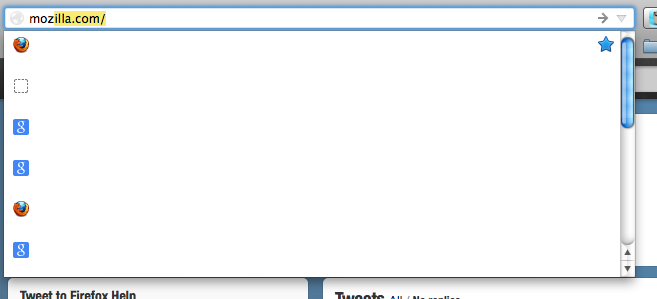
location bar drop down menu no longer displays suggested url text, only favicons

The drop down menu no longer displays visible text of bookmarked or visit history. Favicons display, and field background changes color on mouse over/hover, and a blind clik (based on the favicon) will launch the website.
Could be a setting somewhere jumped the track and set the text display to field background.
Keazen oplossing
This issue can be caused by an extension (Delicious) that isn't working properly.
Start Firefox in Safe Mode to check if one of the extensions (Firefox/Tools > Add-ons > Extensions) or if hardware acceleration is causing the problem (switch to the DEFAULT theme: Firefox/Tools > Add-ons > Appearance).
- Do not click the Reset button on the Safe mode start window or otherwise make changes.
- https://support.mozilla.org/kb/Safe+Mode
- https://support.mozilla.org/kb/Troubleshooting+extensions+and+themes
Alle antwurden (8)
Hello swampgrafx, try to Turn off hardware acceleration and check it again.
thank you
Thanks, no go.
Bewurke troch swampgrafx op
Hi, try to delete localstore.rdf file in profile folder .
see : Corrupt localstore.rdf
if the above does not solve the issue try to Reset Firefox
Transferring data to a new profile - Firefox
thanks again
Didn't work. Will try a full reset later. Seems like this is buried somewhere in the display text as code that might have gotten gacked.
Keazen oplossing
This issue can be caused by an extension (Delicious) that isn't working properly.
Start Firefox in Safe Mode to check if one of the extensions (Firefox/Tools > Add-ons > Extensions) or if hardware acceleration is causing the problem (switch to the DEFAULT theme: Firefox/Tools > Add-ons > Appearance).
- Do not click the Reset button on the Safe mode start window or otherwise make changes.
thanks! Fixed it, but since I use Delicious on a regular basis so will miss functionality.
Bewurke troch swampgrafx op
Can I ask you something? How do you have a scroll bar within your address bar's drop down menu?
Haven't a clue.
Did install Delicious Post 1.5 and haven't had a recurrence.