


[MacOS] Anyone else getting prompted for their location permission in Google every time they search?

I am running the latest public stable release of Firefox, 151.0.1 (aarch64), and these last few weeks I've been getting prompted to grant my location over and over every time I do a Google search. In MacOS, I've granted Firefox location permission and I've repeatedly saved me giving google permission but it doesn't stop. This is happening on my MacBook Pro and Mac Studio.
Anyone else? Any tips? It's maddening. lol
Keazen oplossing
Huh that's weird, however sounds like it's happening: https://bugzilla.mozilla.org/show_bug.cgi?id=2041844 (I originally read the bug as "Tahoe"–only, hence why I asked again, but re–reading it it indeed sounds like Sequoia–only.)
Depending how comfortable you are providing some debugging info on the bugzilla ticket, would you like to perhaps comment on the bug if you can assist in capturing some logs to help understanding the error? Thanks!
Alle antwurden (12)
Permissions granted e.g. in Private windows won't be saved upon exit. If you're on the site asking you the permissions, if you click on the "knobs" button next to the shield icon, does it list any?

This is happening on every Google search or any site that is asking for location permission and has been previously granted or even in the moment it's asking, I'm granting it permission & checking "remember this decision", closing the window, and coming back. Not using InPrivate.
The prompt says "Allow www.google.com to access your location? This will open your system location settings. Please grant location permission to Firefox" and there's a checkbox to remember + an allow or block button. (This is when it's Google requesting the permission of course. It changes the URL depending on the site.)
1) It's not opening my systems location settings, so that's broken.
As to your question, when I click on the little settings slider widget to the left of the domain name, there is only the "Access your location" setting present, and it's set to "Allowed".
Bewurke troch AlienAlpaca op
OK so it's the macOS not granting the permission.
It might be that once denied in the past, the system Settings deeplink won't be allowed to trigger anymore and you have to go to grant that manually. (I can try researching open bugs for that dialog, or its wording if that's no longer the action invoked.)
Do you know how to go to your System Settings and enable it there? (My version has it in "Privacy & Security" › "Location Services" pane.)
What version of macOS you're running, if you don't mind?
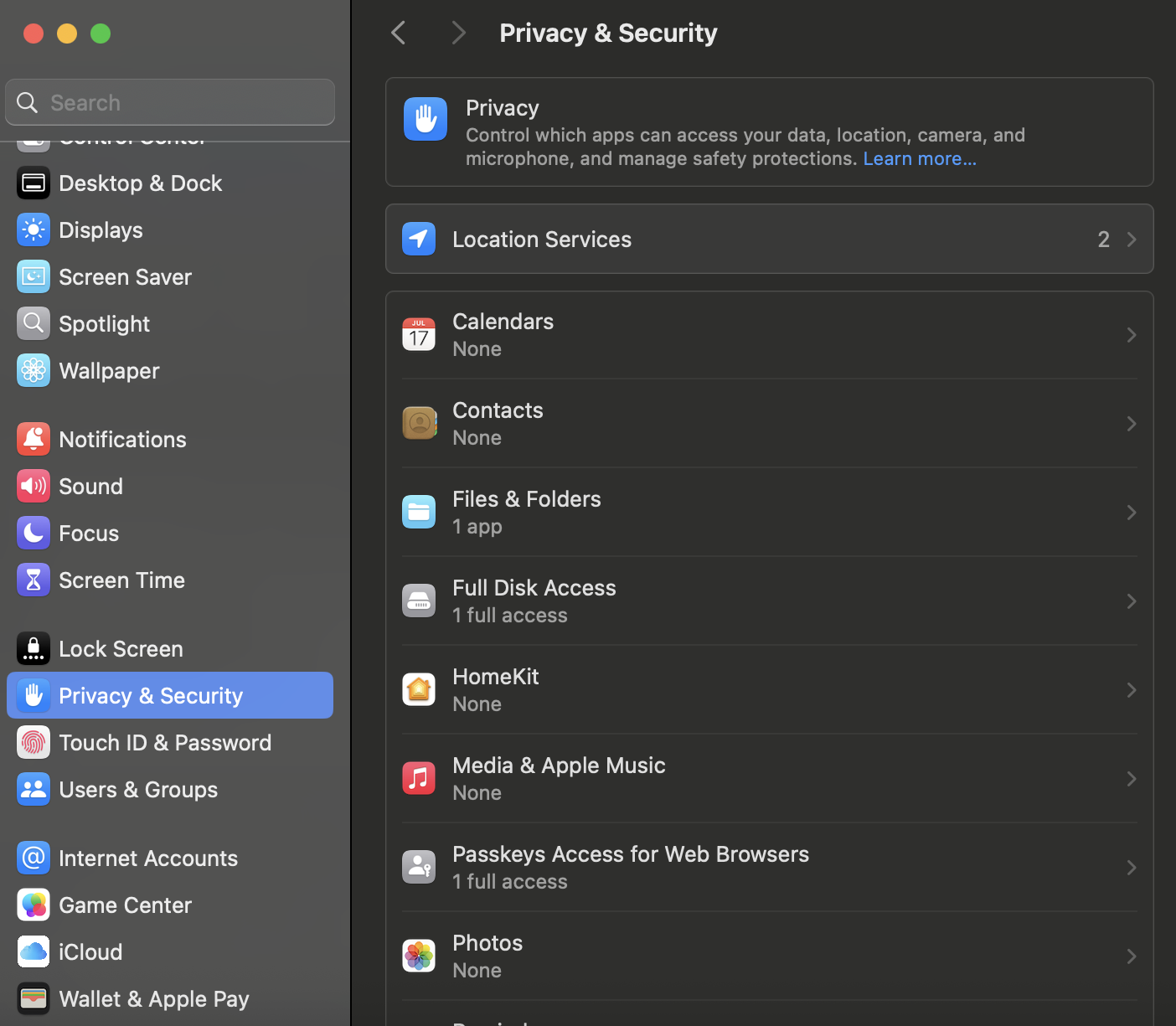
I've never denied Firefox location permission from the moment it was installed on my Mac Studio and MacBook Pro.
I've recently gone into (recently as in last night) and switched location off for Firefox, then turned it back on, as well. And it doesn't change behavior in the app.
Latest public version of Sequoia. 15.7.7.
Very strange bug.
Bewurke troch AlienAlpaca op
Keazen oplossing
Huh that's weird, however sounds like it's happening: https://bugzilla.mozilla.org/show_bug.cgi?id=2041844 (I originally read the bug as "Tahoe"–only, hence why I asked again, but re–reading it it indeed sounds like Sequoia–only.)
Depending how comfortable you are providing some debugging info on the bugzilla ticket, would you like to perhaps comment on the bug if you can assist in capturing some logs to help understanding the error? Thanks!
I've replied to the bug, thanks for the link. What can I do to give debug/diagnostic info?
Wonderful. Now when you're in the contact list for the bug, you'll get updates on the timeline, so if the engineers who are familiar with the underlying issue have any idea for a good logging procedure to help them figure how to even e.g. start reproducing, they might reach out to you for assistance.
This has started cropping up quite recently, and given it's only on the specific later cycle patch versions of 15.7.6+ possibly, it's still in early stages of investigation, so it might not appear to "move too fast" — but now being on the "carbon copy" you'll get pinged with changes. Thanks for the help!
Can someone re open the bug? https://bugzilla.mozilla.org/show_bug.cgi?id=2041844
They closed it before I could confirm the build they gave me resolved the issue, and now it's marked as won't fix????
Wow, that's disappointing.
If it won't be fixed, I can tell you - Firefox will lose lots of users to competing browsers. No one is going to want to click "Allow" every time they search something that pulls user location repeatedly.
Guess I'll go back to Chrome. Sigh. All that work to contribute to this and the devs gripe about the users not getting back to them.
Maybe don't close a bug off from the user who was helping you making it so they can't reply to the bug ticket. Sheeesh. Give people some time.
Bewurke troch AlienAlpaca op
I can actually reopen if the patch did not resolve the issue. It only waits for verification. See https://bugzilla.mozilla.org/show_bug.cgi?id=2041844#c14
"This is now also available nightly.mozilla.org in newest Nightly (from 20260604035506 and later) for anyone willing to test drive for a bit. Thanks."
The bug is "RESOLVED" as "FIXED". That's when the attached patch is approved, and ships in the next Nightly. It is not yet "VERIFIED" which is needed for beta/release uplifts etc.; it is also NOT closed as "WONTFIX" as that's not the case. The only wontfix tracking is against next week's release which this won't make as the cutoff is today.
I'll translate the timeline: - reviewers approved the change in principle, so it can land in Nightly (no need to rely on try build) - it was included in Nightly starting June 4 - since it was not verified in time to ship with v152 beta, it is left in v153 alpha for more testing - today was the last day to nominate v152.0 fixes; this did not make the cut missing the beta - if it gets some broader verification there are still options to uplift it during the next few weeks - if not, it will ship mid–July anyways
Ooh, you're not the reporter, so you can't add to the timeline once the original reporter resolved it!
Sorry for that. That's… yeah, oof. I actually don't know how to work around that in the system. Whatever updates you may have, just leave them here — I'll link any news to the bug timeline.
I've seen it on a similar bug again — sorry I haven't thought of this right away. The best course of action is to just send a plain email to the engineer on the bug as they'd have their account visible if you're logged in — which I see you figured out right away as the best next step, sorry I've mistaken it for a timeline update from the bug, I've forwarded it to the bug for you since. Thanks for the confirmation!
Given how many security and stability releases already happened on v152 this probably won't squeeze in during this cycle, however it's already riding the trains in v153 beta and is slated to roll out in stable release within couple of weeks.
Your contribution is deeply appreciated, worry not! I love this hands on approach and was really impressed with how you helped surface this bizarre issue and assisted from start to end to get this fixed for everybody — I actually reached out to folks right away so that they'd let you know how that help was invaluable and perhaps offer a token of appreciation so that you can get yourself a souvenir reminding you of this collaboration. (Equally the engineers, even when the ticket updates might not exactly convey that, lacking ceremony and pleasantries, are also grateful for this input and impressed with the willingness to assist. So please be proud of yourself, you were the only one of the few individual reporters able to contribute to resolving this, and it was a great example of open source collaboration — something that's so important and essential to this product. Please don't be angry at the process and tools, they tend to show their age sometimes. You did your part just great.)
I switched browsers.