


Search settings

I have unchecked search suggestions in settings but these still appear when I search in Firefox with Google (for which I have disabled trending searches).
What is the point of the setting if it doesn't work?
Alle antwurden (6)
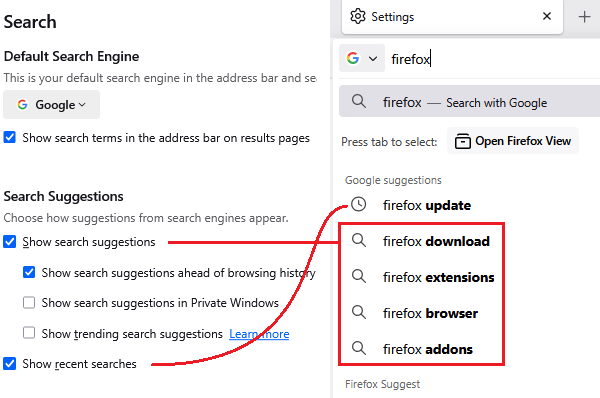
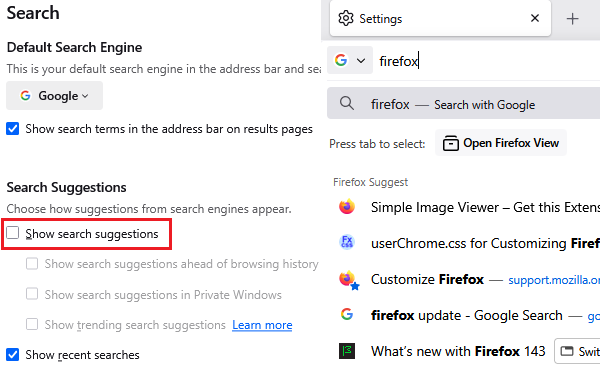
When you disable address bar search suggestions, you should no longer see the magnifying glass rows (dynamic suggestions requested from your search site as you type). You will still see various other kinds of suggestions. Example screenshots attached.
ENABLED:
DISABLED:
Does yours behave differently? If you want to turn off other categories of suggestions, scroll down a bit further to the Address Bar section. See: Address bar autocomplete suggestions in Firefox.
Thanks, but I have disabled search suggestions as in your DISABLED screenshot above but they still appear. As I said peviously, what is the point of this setting if it does not work?
I have also unchecked "Show recent searches"
They still appear in the address bar drop-down in a "Google suggestions" section? Hmm, I don't know why that setting is broken on your Firefox. Could you test in Firefox's Troubleshoot Mode: Use Troubleshoot Mode in Firefox.
Thanks again. I get the same results in Trobleshoot mode.
I'm not really bothered by this so will call it a day. Maybe the issue will b efixed in a future version of Firefox.
There must be something unusual about your Firefox settings files because the checkbox still works for me. Unfortunately, I can't think of an efficient way to track down the source of the problem.
This question has been locked because the original author has deleted their account. While you can no longer post new replies, the existing content remains available for reference.