


Windows 10 reached EOS (end of support) on October 14, 2025. If you are on Windows 10, see this article.

Sykje yn Support

Mij stipescams. Wy sille jo nea freegje in telefoannûmer te beljen, der in sms nei ta te stjoeren of persoanlike gegevens te dielen. Meld fertochte aktiviteit mei de opsje ‘Misbrûk melde’.

Mear ynfo
Dizze konversaasje is argivearre. Stel in nije fraach as jo help nedich hawwe.
Argivearre

High GPU Usage (100%) While Watching YouTube Videos in Firefox

ABDERRAHIM DJ beäntwurde
ABDERRAHIM DJ

Hello Firefox Support,

I’m encountering a strange issue with Firefox. While playing YouTube videos at very low quality (144p) just to listen to music, my GPU usage spikes to 100%. This happens even when the video is not fullscreen and there’s minimal visual content.

System Info:

   Firefox Version: 140.0.2 (64-bit)
   Operating System: Windows 11 
   CPU: AMD Ryzen 7 8700F (no integrated GPU)
   GPU: AMD Radeon RX 7900 GRE
   GPU Driver Version: AMD Adrenalin 25.6.1 

The issue goes away when I disable hardware acceleration in Firefox settings, but I’d prefer to leave it enabled for better performance elsewhere.

Is this a known issue with AMD GPUs or is there something else I can try to reduce GPU usage during playback?

Thank you for your help.
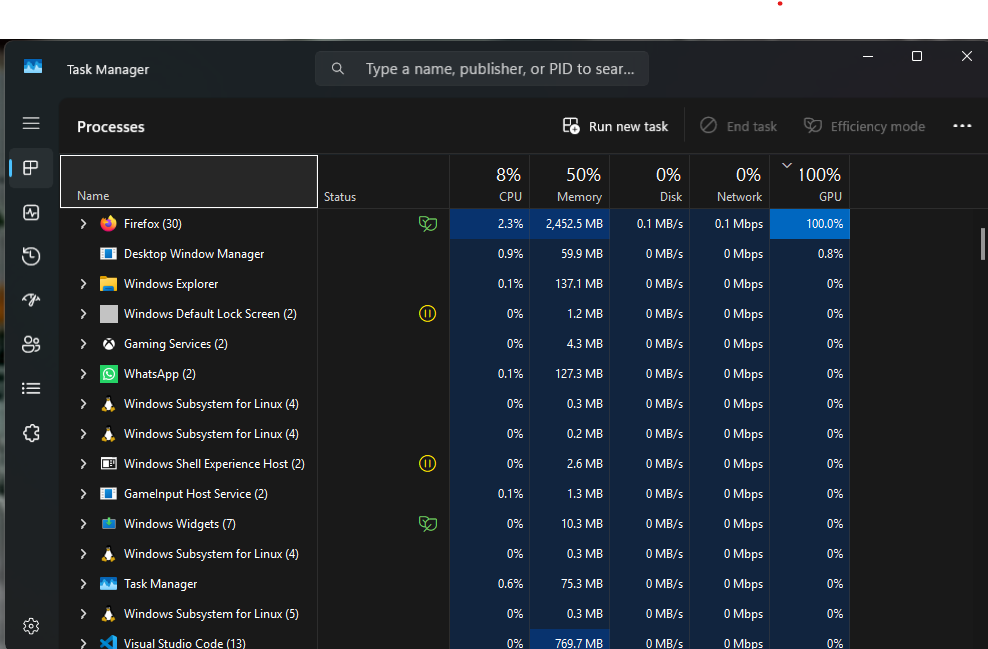
Hello Firefox Support, I’m encountering a strange issue with Firefox. While playing YouTube videos at very low quality (144p) just to listen to music, my GPU usage spikes to 100%. This happens even when the video is not fullscreen and there’s minimal visual content. System Info: Firefox Version: 140.0.2 (64-bit) Operating System: Windows 11 CPU: AMD Ryzen 7 8700F (no integrated GPU) GPU: AMD Radeon RX 7900 GRE GPU Driver Version: AMD Adrenalin 25.6.1 The issue goes away when I disable hardware acceleration in Firefox settings, but I’d prefer to leave it enabled for better performance elsewhere. Is this a known issue with AMD GPUs or is there something else I can try to reduce GPU usage during playback? Thank you for your help.
Keppele skermôfbyldingen

Alle antwurden (2)

Try to enter about:config in the address bar and try to set these preferences:

  • gfx.webrender.overlay-vp-super-resolution = false
  • gfx.webrender.overlay-vp-auto-hdr = false

hi thank you for replying, i solve it by disable hardware acceleration, and i want to know why this keep happening in all the apps that has hardware acceleration active like figma and postman