


Filelink

Hi, I am trying to use Filelink to send a large file. I selected WebDAV and am trying to log in there on Mozilla's Composition screen. Under Private URL it wants me to enter my username and password. I entered my email address and password but error message says account not properly configured, What am i supposed to do?
Keazen oplossing
Do I assume you are looking for assistance with the addon FileLink provider for WebDAV 9 which has it's own support site here https://github.com/thunderbird/webdav-filelink/issues
I installed the addon and it has this as a setup screen
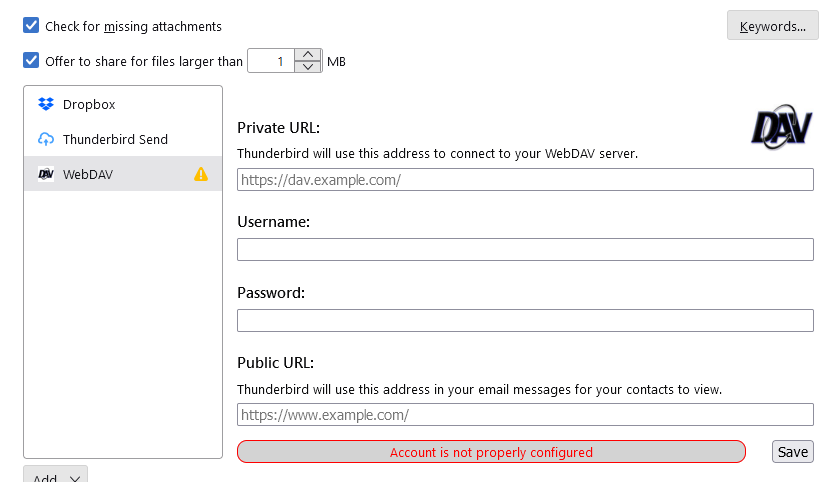
I have to ask you seriously do you have your own webdav server or one you have access to? That is you have a private account with a private URL you can use on a webdav server. I do not and most people do not.
The username and password details that go under that link are the username and login details provided to you by your webdav provider to access the link you have entered.
I understand you can use webdav to access apple icloud. But as there is an icloud addon for Thunderbird filelink I would not recommend using the bare webdav route.
What I am really asking is webdav really the best choice for you. Most folk use Box, Dropbox or send, or as I mentioned Nextcloud/owncloud.
Looking over the current offerings, I think FileLink provider for Send might be a good choice, but it also requires you to be a little technical as you have to specific send instance. ALthough there is a list on the support site. Addon: https://addons.thunderbird.net/en-uS/thunderbird/addon/filelink-provider-for-send/
Dit antwurd yn kontekst lêze 👍 1Alle antwurden (2)
Keazen oplossing
Do I assume you are looking for assistance with the addon FileLink provider for WebDAV 9 which has it's own support site here https://github.com/thunderbird/webdav-filelink/issues
I installed the addon and it has this as a setup screen
I have to ask you seriously do you have your own webdav server or one you have access to? That is you have a private account with a private URL you can use on a webdav server. I do not and most people do not.
The username and password details that go under that link are the username and login details provided to you by your webdav provider to access the link you have entered.
I understand you can use webdav to access apple icloud. But as there is an icloud addon for Thunderbird filelink I would not recommend using the bare webdav route.
What I am really asking is webdav really the best choice for you. Most folk use Box, Dropbox or send, or as I mentioned Nextcloud/owncloud.
Looking over the current offerings, I think FileLink provider for Send might be a good choice, but it also requires you to be a little technical as you have to specific send instance. ALthough there is a list on the support site. Addon: https://addons.thunderbird.net/en-uS/thunderbird/addon/filelink-provider-for-send/
Thanks Matt. It worked using Filelink provider for Send