


cannot send message

I changed my incoming to OAuth2 and I was able to receive messages in Thunderbird from my AOL (Verizon) account but I cannot send messages. It asks me for password, when I enter password it states "Login to server smtp.verizon.net with username [email edited] @verizon.net failed." There is no OAuth2 for outgoing
Please help thank you
Bewurke troch James op
Keazen oplossing
There are reports that changing the outgoing server will enable the OAuth2 menu item. It may not work for everyone though. See https://support.mozilla.org/en-US/questions/1359090
In case it doesn't work, you'd have to go the app password route.
Dit antwurd yn kontekst lêze 👍 1Alle antwurden (8)
AOL requires an APP password. Try logging into your AOL account, locate the security section and I believe there is a place to create an APP password.
If I create an APP password from AOL will I still be able to log into AOL webmail using the old password?
The two passwords server different purposes. Your old password will work on web; the APP password is a security aspect that AOL uses when accessing from a PC client.
Thanks.....do I need to have AOL create APP password for incoming and then another one for outgoing?

Before messing with an app password, why don't you try to set OAuth2 authentication for the outgoing server as well?
I tried that but there is no option under the outgoing for OAuth2
see attached screenshot
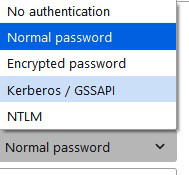
Keazen oplossing
There are reports that changing the outgoing server will enable the OAuth2 menu item. It may not work for everyone though. See https://support.mozilla.org/en-US/questions/1359090
In case it doesn't work, you'd have to go the app password route.
Christ1,
Thankyou! that solution works......