


Join us to show up for other Firefox users 🦊. Earn fun badges and Mozilla swag vouchers! Find out more: https://mzl.la/askafox150

Windows 10 reached EOS (end of support) on October 14, 2025. If you are on Windows 10, see this article.

Sykje yn Support

Mij stipescams. Wy sille jo nea freegje in telefoannûmer te beljen, der in sms nei ta te stjoeren of persoanlike gegevens te dielen. Meld fertochte aktiviteit mei de opsje ‘Misbrûk melde’.

Mear ynfo

Dizze konversaasje is argivearre. Stel in nije fraach as jo help nedich hawwe.

Browser hacked?

  • 2 antwurd
  • 1 hat dit probleem
  • 99 werjeftes
  • Lêste antwurd fan FredMcD
  • Oplost

So I was reading manga and the top fifth of my monitor went white. Full white. Non-interactable. Almost like it's not there. I can't access task menus or bars. No tabs. No search. Nothing. Uninstalled and Reinstalled and problem persists. Cleared cache and cookies.

OS Info: Edition: Windows 10 Home Version: 20H2 Installed: 8/1/2021 OS build: 19042.1288 Experience: Windows Feature Experience Pack 120.2212.3920.0

Device Info: Processor: 11th Gen Intel(R) Core(TM) i7-11700KF @ 3.60GHz 3.60 GHz Installed RAM: 16.0 GB (15.7 GB usable) System type: 64-bit operating system, x64-based processor

Mozilla Info: Up to date. Checked for updates by using keyboard commands (Ctrl+Alt+A).
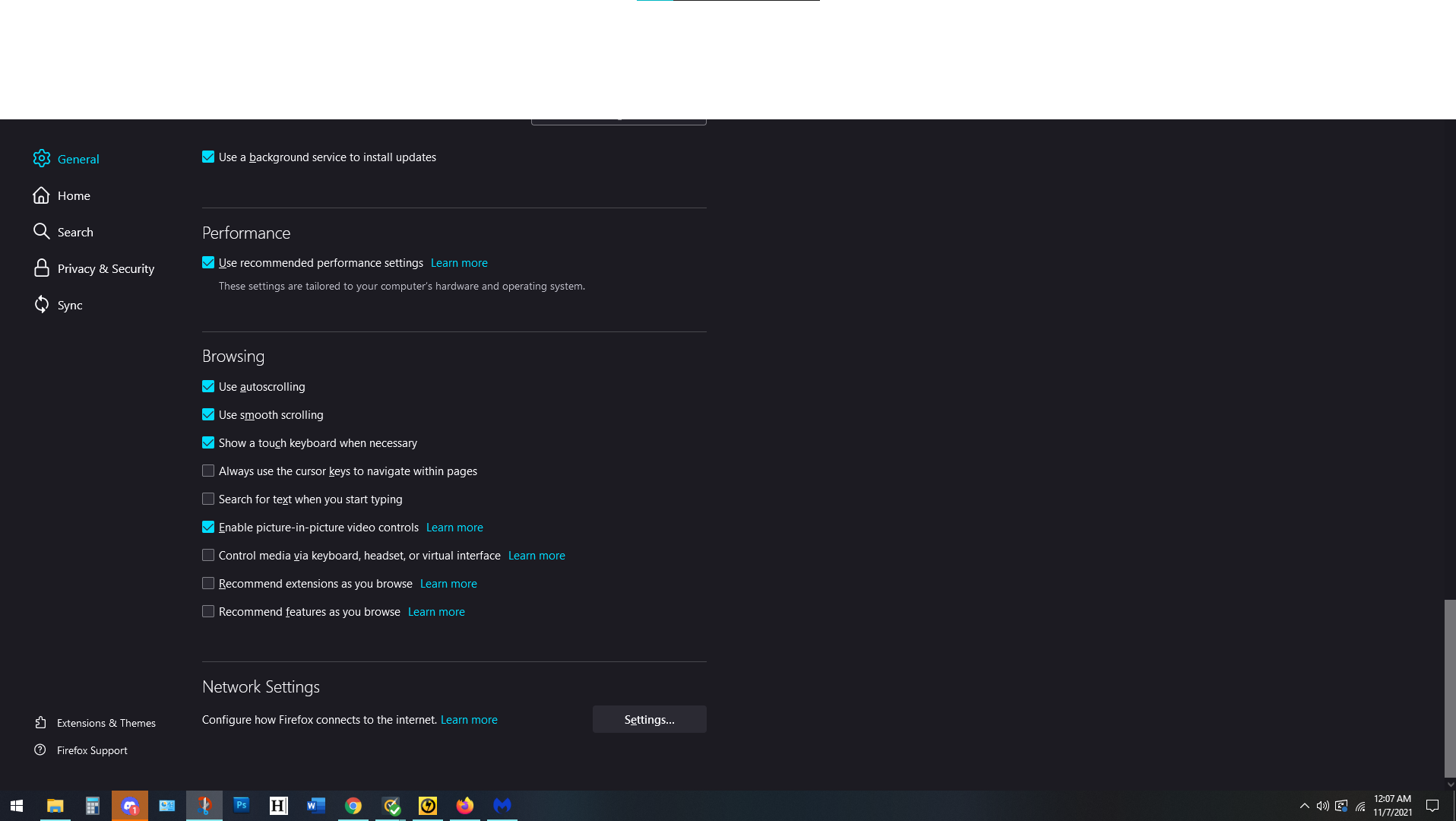
So I was reading manga and the top fifth of my monitor went white. Full white. Non-interactable. Almost like it's not there. I can't access task menus or bars. No tabs. No search. Nothing. Uninstalled and Reinstalled and problem persists. Cleared cache and cookies. '''OS Info:''' Edition: Windows 10 Home Version: 20H2 Installed: ‎8/‎1/‎2021 OS build: 19042.1288 Experience: Windows Feature Experience Pack 120.2212.3920.0 '''Device Info:''' Processor: 11th Gen Intel(R) Core(TM) i7-11700KF @ 3.60GHz 3.60 GHz Installed RAM: 16.0 GB (15.7 GB usable) System type: 64-bit operating system, x64-based processor Mozilla Info: Up to date. Checked for updates by using keyboard commands (Ctrl+Alt+A).
Keppele skermôfbyldingen

Keazen oplossing

Start Firefox using Troubleshoot(Safe) Mode {web link}

A small dialog should appear. Click Start In Troubleshoot(Safe) Mode (not Refresh). Is the problem still there?

Dit antwurd yn kontekst lêze 👍 1

Alle antwurden (2)

Note: It's ONLY Firefox. Everything else works fine.

Keazen oplossing

Start Firefox using Troubleshoot(Safe) Mode {web link}

A small dialog should appear. Click Start In Troubleshoot(Safe) Mode (not Refresh). Is the problem still there?