


Firefox Screenshot Utility Missing from Three Dot Menu
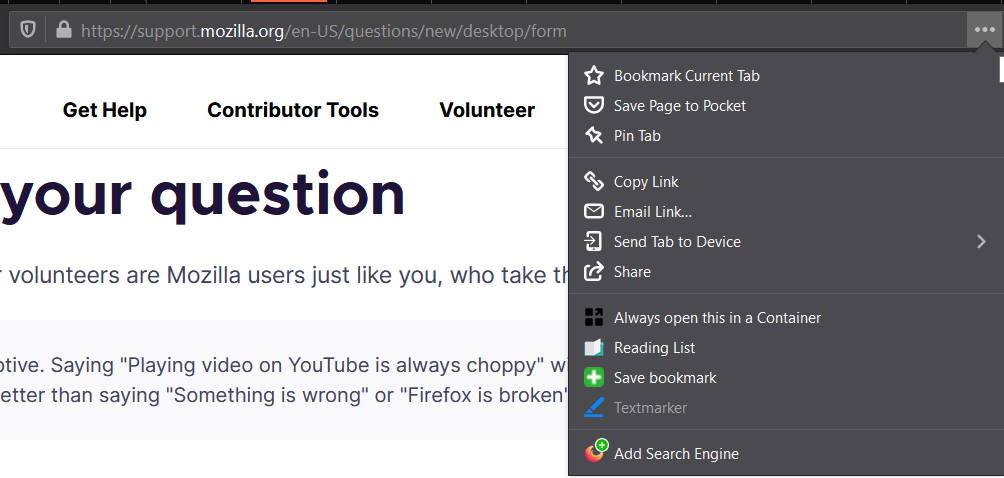
I use the browser-integrated snipping/screen-shot tool constantly. Today I discovered that it is no longer available from the three dot menu in the address bar. Why? Can it be restored? Has it been relocated? Discontinued? This is one of the primary features that I rely on in Firefox.
Keazen oplossing
This picture isn't worth 1,000 words but I'll share it as an illustration of the last reply:

Alle antwurden (8)
Hi
You can now find this in the right click context menu in Firefox.
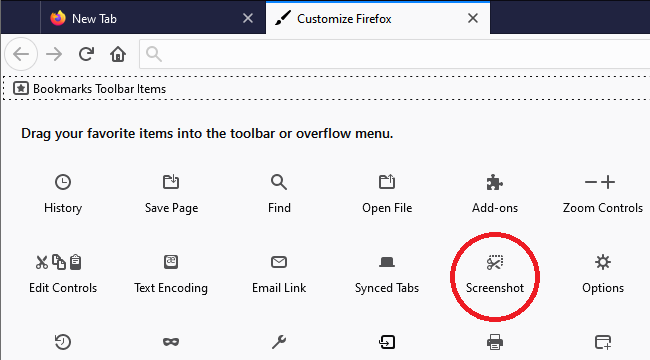
Take a Screenshot has been moved out of the page actions container and has become a standalone toolbar button. You can drag this button in customize mode out of the the Customize palette to the toolbar or overflow area. You can also use the "Ctrl+Shift+S" keyboard shortcut (Windows/Linux) or right-click free space on a webpage like posted above.
Keazen oplossing
This picture isn't worth 1,000 words but I'll share it as an illustration of the last reply:
Thank you to everyone who replied. All very helpful. I'm annoyed that it's been moved (hard to change habits) but very glad to see that it still exists. Much obliged to you all.
Would any of you fine gentlepeople happen to know why the screenshot tool no longer has the option to auto-select an element of the page? A minor issue in comparison to having the tool go away, but why remove functions that already exist?
Bewurke troch wynden op
Do you mean, as you move the cursor around, Firefox doesn't keep changing the position of the box with the dashed border? Mine is still doing that, so perhaps there is some difference in our configurations?
Ah, curious. On the first webpage I attempted to use it since the change, it was not auto-selecting elements and it appeared to me that the option was missing from the utility menu. But on this page it is performing the auto-selection even though the menu option is not explicitly listed. It must have been something about that particular page. Thanks for the clarification and sorry for my confusion. :)