


FiltaQuilla Plugin -> Message Filters -> Filter Messages where Cc is empty

Hi,
I want to apply a Message Filter to all Messages where the "Cc" Field is empty. That means I want to filter all messages where I am the only official recipient .
If I look at the filters there is no way to Filter "Cc is empty" If I just leave the text field blank there is no effect.
I learned about the "FiltaQuilla" Plugin:
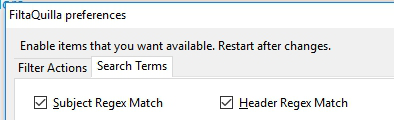
I enabled "Header Regex match"

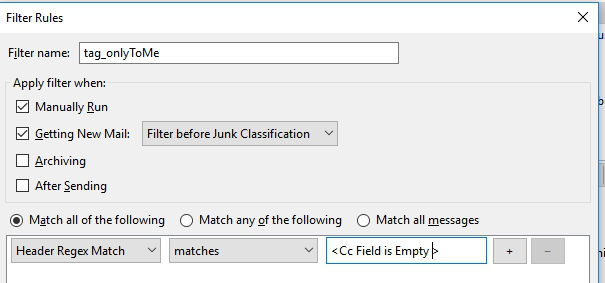
Now if I go to "Tools -> MessageFilters -> I can match "Header Regex Match"
I want to match "If Cc is empty"
 As I recall the "Cc" field is part of the header -> Can anyone help me to get the correct regular expression.
Hi,
I want to apply a Message Filter to all Messages where the "Cc" Field is empty.
That means I want to filter all messages where I am the only official recipient .
If I look at the filters there is no way to Filter "Cc is empty"
If I just leave the text field blank there is no effect.
I learned about the "FiltaQuilla" Plugin:
I enabled "Header Regex match"
<img src="https://image.ibb.co/njBbFA/screenshot-1099.jpg" alt="screenshot-1099" border="0">
Now if I go to "Tools -> MessageFilters -> I can match "Header Regex Match"
I want to match "If Cc is empty"
<img src="https://image.ibb.co/gaRbFA/screenshot-1100.jpg" alt="screenshot-1100" border="0">
As I recall the "Cc" field is part of the header -> Can anyone help me to get the correct regular expression.
Bewurke troch fdgregerg op
Alle antwurden (1)
Thanks, I did not think about this easy solution that does not even need a plugin