


emails do not print properly when using MS Outlook

I was forced by msn.com to accept an 'upgrade' of MS Outlook vice Hotmail for my msn account. With Firefox 19 Outlook loads, and I can read my email, however I don't get Outlook buttons for printing, etc. If I try and print an email with Firefox (click on file, then print,) the output is not the email, but rather a 'display' print, i.e., the entire email will not print if a long one, and all the screen items print as well. I am at a loss trying to fix this, and have spent lots of time trying to find answers online. I'm using Windows 7. Any assistance would be greatly appreciated.
Solution choisie
On mine, there is a "..." menu where I have the command to pop-up a print-formatted version of the message. Can you find that, and does the pop-up open? If it's blocked, you might need to create an exception in the pop-up blocker for live.com.
Lire cette réponse dans son contexte 👍 14Toutes les réponses (2)
Solution choisie
On mine, there is a "..." menu where I have the command to pop-up a print-formatted version of the message. Can you find that, and does the pop-up open? If it's blocked, you might need to create an exception in the pop-up blocker for live.com.
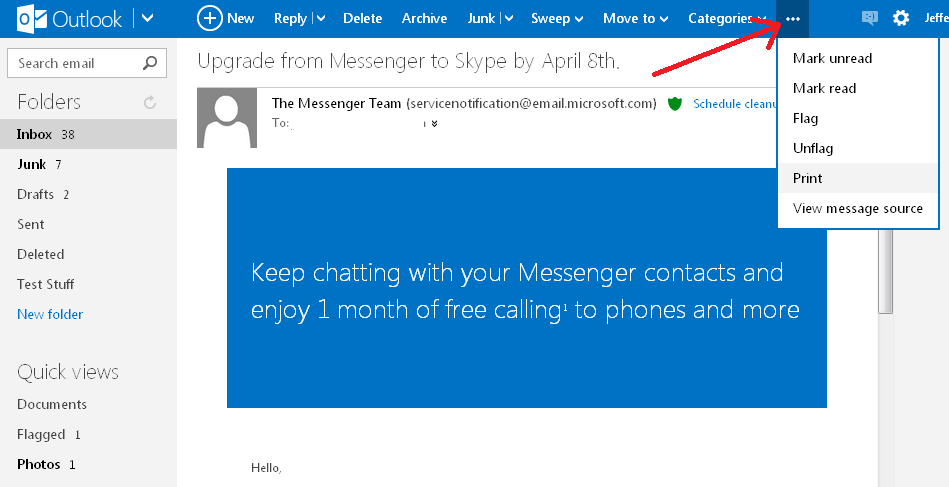
To all who have responded to my query - thanks very much. Apparently what was obvious to others was not obvious to me - I did not make the connection that three dots implied a print option, especially since other email functions had their own displayed buttons in outlook. Cheers,