


My Tbird ver 140.8.0esr shows 2026 Feb 29 which does not exist. what can I do?

I don't know what to do when February 29 is in my calendar, 2026 is not a leap year. I've found nothing to help me. I have the latest version if Thunderbird. Thanks
Toutes les réponses (2)
Solution choisie
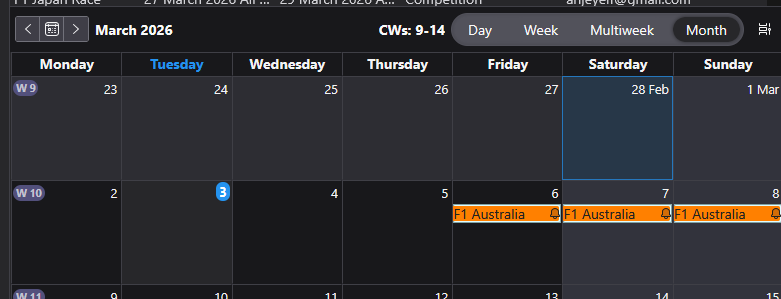
In using Windows 11 and version 140.8.0esr I'm not seeing an issue. I've posted an image below. It shows 28th feb 2026 followed by 1st March.
Can you please upload an image that shows the problem. Select the default 'Home' calendar Select 'Monthly' option Make sure we can see the section above the actual calendar, that says what selected and calendar itself shows part of feb and all of March. Basically upload image that shows same info as my image.
Where did you get the download of Thunderbird ?
eg: Windows App Store, or download from the official website here: https://www.thunderbird.net/en-US/thunderbird/all/

That a calendar/date handling bug somewhere rather than anything you did wrong. 2026 is not a leap year, so February 29 shouldn’t appear at all. First thing checkwhether your system date, timezone and regional settings are correct in Windows itself, because Thunderbird sometimes inherits odd date behaviour from the OS/calendar libraries.
You could also try: switching Thunderbird to another calendar view temporarily disabling/re-enabling calendar add-ons creating a new test calendar clearing cached calendar data if you use CalDAV/Google calendars If the phantom Feb 29 only appears in one specific calendar, then it’s probably a sync/data issue from that calendar source rather than Thunderbird itself.
Modifié le par AlHafilat