


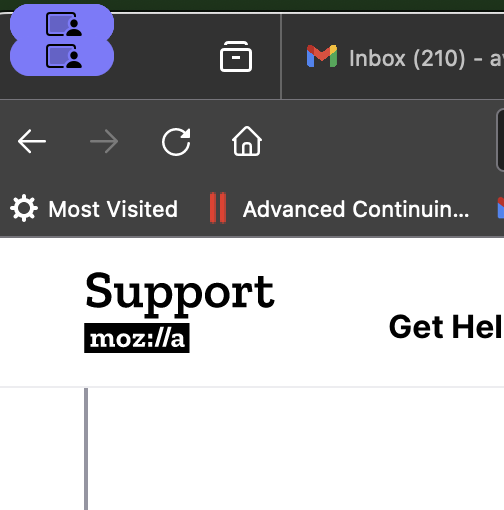
Little purple icon in upper left corner obscures important controls

Over the last week, a little purple icon appears in upper left corner of my firefox browser, it looks like a person viewing a screen. It sits right on top of the red-yellow-green circles that allow me to minimize, enlarge, or close the browser, and renders Firefox unusable. How do I get rid of it?
Toutes les réponses (3)
I ran the icon through Google image search and found this:
https://www.reddit.com/r/MacOS/comments/17k6z9b/how_to_disable_capturing_screen_icon_in_menu_bar/
Further searching turned up:
https://www.reddit.com/r/MacOS/comments/170f6mr/sonoma_screen_capture_menu_bar_notification_is_so/
As a Windows person, I think I'll leave it to Mac users to take it from here.
See also this bug report:
- 1856305 - Firefox on macOS casually indicates active screen sharing (MacOS 14)
Modifié le par cor-el
In case this was coincidentally fixed in Firefox 124 (toward the end of the comments on the bug, people says they could no longer reproduce it), you could consider updating. See: Update Firefox to the latest release.