


Join us to show up for other Firefox users 🦊. Earn fun badges and Mozilla swag vouchers! Find out more: https://mzl.la/askafox150

Windows 10 reached EOS (end of support) on October 14, 2025. If you are on Windows 10, see this article.

Rechercher dans l’assistance

Évitez les escroqueries à l’assistance. Nous ne vous demanderons jamais d’appeler ou d’envoyer un SMS à un numéro de téléphone ou de partager des informations personnelles. Veuillez signaler toute activité suspecte en utilisant l’option « Signaler un abus ».

En savoir plus

Firefox won't let me save any passwords/login info

  • 1 réponse
  • 0 a ce problème
  • 31 vues
  • Dernière réponse par Damon
  • Archivé

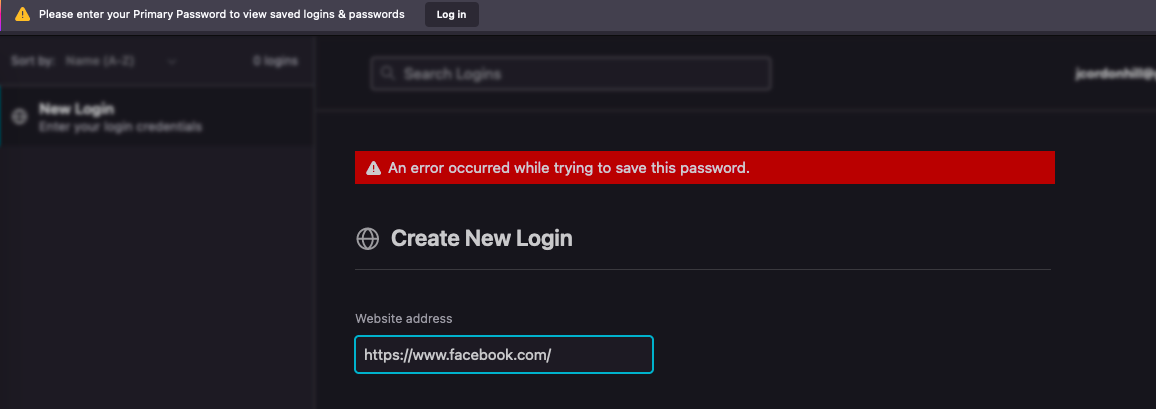
Every time I log into a website, it asks if I want to save the password, and I click save, but it doesn't work. When I go into my account and try to add a saved login, it says "An error occurred while trying to save this password" and at the top a small bar appears saying I need to enter my primary password to log in, despite the fact that I'm already logged in and when I click the log in button it just goes back to the logins and passwords page and nothing has changed. I've tried quitting and restarting, changing all my preferences, nothing works. I've googled everything I can think of with no answers to my issue. Please help or I'm going to give up on Firefox and never use it again!
Every time I log into a website, it asks if I want to save the password, and I click save, but it doesn't work. When I go into my account and try to add a saved login, it says "An error occurred while trying to save this password" and at the top a small bar appears saying I need to enter my primary password to log in, despite the fact that I'm already logged in and when I click the log in button it just goes back to the logins and passwords page and nothing has changed. I've tried quitting and restarting, changing all my preferences, nothing works. I've googled everything I can think of with no answers to my issue. Please help or I'm going to give up on Firefox and never use it again!
Captures d’écran jointes

Toutes les réponses (1)

Thanks for attaching the screenshot. This screenshot looks like it is from the Desktop version of Firefox, but the forum in which you've posted is for this iPhone/iPad version of Firefox. I suggest posting your question in the general Firefox Support Forum where you're more likely to receive assistance.