


Video playback (e.g. Youtube) slow, drops frames - VLC runs URL OK

On an older laptop running Ubuntu 16.04 LTS, with latest production Firefox version as of 24 Sep 2018, Youtube and other videos play poorly, loosing many frames or freezing video entirely, though audio continues. Restarting in Safe mode, all add-ons disabled, did not help at all.
Enabling and disabling Hardware acceleration and changing the maximum number of processes from 4 to other values (1, 2 and others) also did not improve display.
The Youtube HTML5 player verification, https://www.youtube.com/html5, shows all items checked, i.e. supported.
In contrast, copying the URL for thew video and pasting it into VLC (VideoLAN) network stream runs the video perfectly, so this is strictly a Firefox issue.
Google Chromium for Ubuntu was installed and played videos a bit more smoothly than did Firefox, though not as smoothly as VLC.
This appears to be a buffering issue. Increasing media.cache_readhead_limit and media.cache_resume_threshold did not force buffering for uninterrupted playback, though.
Modifié le par MoisheP
Toutes les réponses (4)
Try disabling graphics hardware acceleration in Firefox. Since this feature was added to Firefox it has gradually improved but there are still a few glitches.
You will need to restart Firefox for this to take effect so save all work first (e.g., mail you are composing, online documents you're editing, etc.,) and then perform these steps:
In Firefox 54 and below:
- Click the menu button
 and select Options (Windows) or Preferences (Mac, Linux).
- Select the Advanced panel and the General tab.
- Uncheck Use hardware acceleration when available.
- Close Firefox completely and then restart Firefox to see if the problem persists.
In Firefox 55 and above:
- Click the menu button and select Options (Windows) or Preferences (Mac, Linux).
- Select the General panel.
- Under Performance, uncheck Use recommended performance settings. Additional settings will be displayed.
- Uncheck Use hardware acceleration when available.
- Close Firefox completely and then restart Firefox to see if the problem persists.
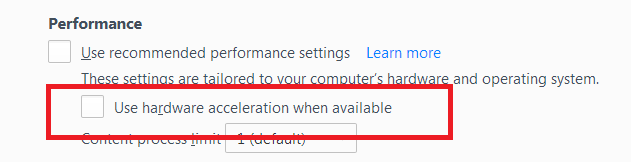
Did this fix your problems? Please report back to us!
If the problem is resolved, you should check for updates for your graphics driver by following the steps mentioned in these Knowledge base articles:
MoisheP said
On an older laptop running Ubuntu 16.04 LTS
Do you get all check marks as blue on https://www.youtube.com/html5 ?
If a couple are red then you may not have FFmpeg installed. Ubuntu for example has a Ubuntu Restricted Extras for this.
Modifié le par On Break --- Veteran Moderator
FFus3r and james, Thank you for your suggestions, though they have not resolved the issue. The question has been edited to show that they were tried, though.
Hi, please try a Refresh but Note that this does more than uninstalling and re-installing does. Normal uninstalling does not remove some preferences which may have become corrupt. Please Refresh but do this 1st:
- https://support.mozilla.org/en-US/kb/export-firefox-bookmarks-to-backup-or-transfer
- https://support.mozilla.org/en-US/kb/back-and-restore-information-firefox-profiles
then